- Details
- Written by: Chris
- Category: Standard
- Hits: 6365
You know you enhance your productivity with ChatGPT. With K3 you excel to another level. You get more done. Faster.
Go figure out if every day would be more productive for you. What would that mean? And if all the members of your team worked with K3?
What impact would it get on the bottom line? And how much revenue would you bring in? See how you work smarter with K3 in this example.
So let us demonstrate. Lets say you will write an article about Keto Diet and start ChatGPT in K3 or in ChatGPT with OpenAI.
Lets compare the work progress from the prompt to the final PDF.
Order today and start amplify your creativity with K3!
-
K3
-
ChatGPT
- Details
- Written by: Chris
- Category: Standard
- Hits: 2099
Upgrade now!
to K3 Business Class ChatGPT.
This offer will only last for a limited time only. ChatGPT in Business Class will boost your productivity! It's a unique one-time offer. For a chosen few.




$ 79
In Sweden: You can also Swish 830 SEK to 1232266666
Upgrade your team with your customized Academy!
Have you already signed up?
Details: Full access to the ChatGPT Business Class K3 service for 79 USD from the day of order to Dec 31, 2025.
No trials. But we offer a full 14-day All Money Back Guarantee!
We have only reserved 10000 spots for this offer, and if this link or payment function does not work, it has ceased to exist. We have sold out. "Seats are limited". It's up to you.
Considering 500 million people have joined ChatGPT service in 2023 and you will have a better version with K3, would you fly Economy or Business Class? This is a no-brainer... Sign-up today!
-

$0
ChatGPT Free version
-
-
$20
ChatGPT Plus "Economy"
-
-

$79
ChatGPT Business Class
-
Frequently Asked
Questions
If this offer seems to good to be true, please read the FAQs below.
-
How does the K3 ChatGPT Business Class differ from the ChatGPT service from OpenAI?
Why would you not buy a subscription from ChatGPT directly "from the source" and not through us as a third party?
This is a valid question we would ask ourselves in your situation. The short answer: Because we have built a solution on top of the ChatGPT and added many excellent functions. (see list abobe).It is like the airplane: It takes all passengers from A to B. Some can sleep in a bed, drink champagne and have top-notch service not available to all. Some are flying in Economy Class and are only concerned with going from A to B.
It is up to you to decide if it's worth the extra 79 USD on a one-time fee for access during 2024. Please scroll up above to view the functions. Perhaps only one of them will save you 79 USD in thirty minutes? -
How long will the one-time fee and service last?
We offer 10000 "seats" for 79 USD as an introductory special offer. We will serve our clients the service if ChatGPT does not close, change its terms of service or price list for API for developers, or force major hits us.
However, we only promise to keep this ability and offer a one-time offer to give you access to our KLMS-based service in the K3 platform until Dec 31, 2024. After that, you can download all your content or continue our service with a new offer.
We also have the right to limit the prompter requests to 50 per day, or if misused for any reason we see fit, we will dismiss you from the Business Class version. Hence, 10000 spots is what we offer since this service is exclusive.
We are rapidly in the change of things in 2024. So this is what the deal is about. No hidden costs. No hidden services. No auto prolonging. Just a super-great functionality to get ahead of everybody else in 2024. -
What kind of support does ChatGPT Business Class from K3.io provide?
chat.k3.io, K3.io or K3 is a part of the learning management platform K3, former known as KlickData or KLMS, a brand under the Klick Data AB (publ) company based in Sweden. We have over 30 years of experience and are a public company under the rules of Swedish and European Law.
Our service is based on the premises of our clients and the long term reputation we have built as a trustful partner. We provide a wide range of service solutions. This offer comes with the ability to contact us through email, chatbots, and the internal message system supplied inside the KLMS, where you will have an account with all your prompts. -
What happens when my plan expires?
You will no longer be "flying ChatGPT Business Class K3," and technically, you cannot create, send, edit, download, or publish your prompts and the replies from ChatGPT inside the K3 system you have made.
You will, however, always have a chance to get access to the already created material so you can enjoy the results you have created for your work during the period you have been "on board" in the K3 system.
If the bot is the horse and you are the rider, you can no longer ride, but the memories (prompts) you shared will not be lost. We keep the Material and Resources in our database until you retrieve them or we are forced to delete them by law (GDPR). -
Is there a free trial available?
We do not offer a free trial before purchase due to demand and this limited introduction offer. Please use ChatGTP as a regular service from OpenAI. We do offer a full refund within 14 days with no questions asked if you are unsatisfied with the ChatGPT Business Class K3 service.
-
Can I upgrade my subscription later?
Yes, you can. If you move to a plan with your own Academy, you will still have access as a user in the K3 Academy. You can easily switch between accounts in the menu. The same applies if your company, team or organization subscribes; you can have a private account in K3 for your private sphere and personal interests.
-
What if I'm only interested in one feature from a different plan?
Contact us, and we will inform you about the upgrade plan for you, your team, or your enterprise. ChatGPT Business Class K3 is a part of the KLMS-based solution from Klick Data, and we offer many great upgrade alternatives that will tailor your needs.
-
Can I cancel my subscription at any time?
Yes.
The ChatGPT Business Class K3 offer at this site is a subscription service with a fixed amount and with a defined end date of Dec 31, 2024. You will not be forced or charged to prolong the subscription.
You might get an offer to stay for 2024 and beyond. If you like to cancel and end your subscription before the end of Dec 31, 2024, you are free to do so and we comply with GDPR. -
What would I normally pay?
Our regular rate for this service, compared to the K3 we now offer for the rest of 2024, is 19 USD/ month (199 USD/ year). So 79% is an up to 60% one-time off introduction offer.
As we said: This is a No Brainer offer and it will not be extended beyond 10000 clients.
Why? Because we aim to be the best, we can not serve all in Business Class to be able to help clients with a premium. Yes. We think we will get all 10000 clients to stay in 2024 because we will deliver massive value in ChatGPT Business Class K3.
Suppose some of you will leave: it's perfectly fine. We will then be able to sell this spot to someone else. K3 is for the chosen few who understand the power of AI at the stellar level.
Do you still think this is "too good to be true"? We will still give you a 14-day money-back guarantee. It also works both ways. If you misbehave as a client in Business Class ChatGPT, we will give you the money back, and you will not be able to join again.
This service is aimed at clients who strive for the clients who are used to the best. Clients who are used to flying business class and private jets and meet C-level people around the globe. We will share information in the K3 platform K3 among our clients to maximize revenues from ChatGPT.
We not only think you will like this: We know you will be staying with us.
Now that you read this far. Now, follow your instinct and decide: Pay and join. Or dismiss this offer. -
Who is behind the solution for ChatGPT Business Class K3?
K3.io is owned by Klick Data AB, a public company based in Stockholm, Sweden. We have served 25000 clients, delivered over 1.6 million video tutorials, and have created K3 and KLMS learning management systems for over 30 years. Currently, we have over 460000 users registered in the K3 ecosystem, helping clients be their strategic partners in assessment and knowledge management.
AI and ChatGPT are as new to us as the rest of the World, but our expertise in getting our clients a head start has helped us get where we are today.
Didn’t find the answer to your question? And a demo.
- Details
- Written by: Chris
- Category: Standard
- Hits: 9707
Sorry, Sam Altman. It is not fair. But we love you anyway!

K3 and ChatGPT work together like two hands instead of one. You and your team will be so much more productive. You have all the greatness from ChatGPT. Enhanced with an authoring tool from K3, that you will love even more than ChatGPT!
With K3, ChatGPT works so much better to enhance your daily productivity.
Let us explain and explore K3 below!


K3 and API to ChatGPT explained
ChatGPT is a sensational large language model (LLM) that millions, if not already a billion, have loved and used in 2023.
K3 is an award-winning AI Learning and Training Management System and platform for assessment and training from KlickData.
K3 works together with ChatGPT with an API to OpenAI.
Simply put, we have included a better version of ChatGPT in the award-winning platform K3. K3 is not a LLM. K3 is a platform that has created a layer between you and ChatGTP from OpenAI. K3 uses an API as a backdoor to OpenAI's greatness of delivering replies of text and images as you are used to with ChatGPT.
This will greatly benefit your productivity, team, and organization using ChatGPT inside K3. We call this K3 ChatGPT in Business Class!
K3 also uses many other AI tools and has tons of great stuff besides ChatGPT to help companies grow, but this presentation compares K3 and ChatGPT only from the perspective of ChatGPT without K3.
Comparing ChatGPT at OpenAI and ChatGPT inside K3 will give you huge advantages without drawbacks. And it will save you the bucks!
K3 is filled with great functionality, besides the ChatGPT upgraded Business Class version. Given this, we can put all of this aside and disregard these features and still give you much greater value than if you would upgrade the ChatGPT free version to a ChatGPT Plus version directly to OpenAI.
So scroll more to see the value between K3 and ChatGPT below.
Yes. We think you will love K3 as much as we do when you have compared what you get.
To use the Business Class version of ChatGPT in K3, you need to get an account in the K3 ecosystem, the K3 platform. You can buy it individually or through your company, which has set up an Academy in K3. You will get a much lower price and a better version than ChatGPT or ChatGPT Plus. That's called value.
-
Account setup in K3
The simplest way to sign up for K3 is to click on the Buy menu in the upper right.
1. You will pay for a subscription.
2. You will receive a registration mail
3. You register your email and password
4. You are in and are ready to use K3 with ChatGPT.You don't need an account at OpenAI.
-

The Backdoor to ChatGPT is always open in K3
Signing up for ChatGPT K3 Business Class gives you access to ChatGPT inside K3, among other functionalities. You will have your own account in K3, which will exclusively work for you.
The K3 platform then has a backdoor to OpenAI, and you will never get a message from OpenAI saying, "Come back later." If you used the free version of ChatGPT, you know this phenomenon was common in 2023 due to its phenomenal growth and success.
In K3, you are VIP when it comes to ChatGPT.
In fact, when we summarized 2023 from the perspective of K3, there has not been one single inquiry interruption since we introduced this service on January 24, 2023.
This is one of the main reasons you would like to join the K3 service we offer. When you like ChatGPT to work for you, the AI shall not be on parental leave or vacation, sick, hangover, or not in the mood. K3 makes sure the bot is up and running to deliver your requests. This means you can always work with ChatGPT in K3, even when ChatGPT is down. It is the VIP Lounge when you travel Business Class.
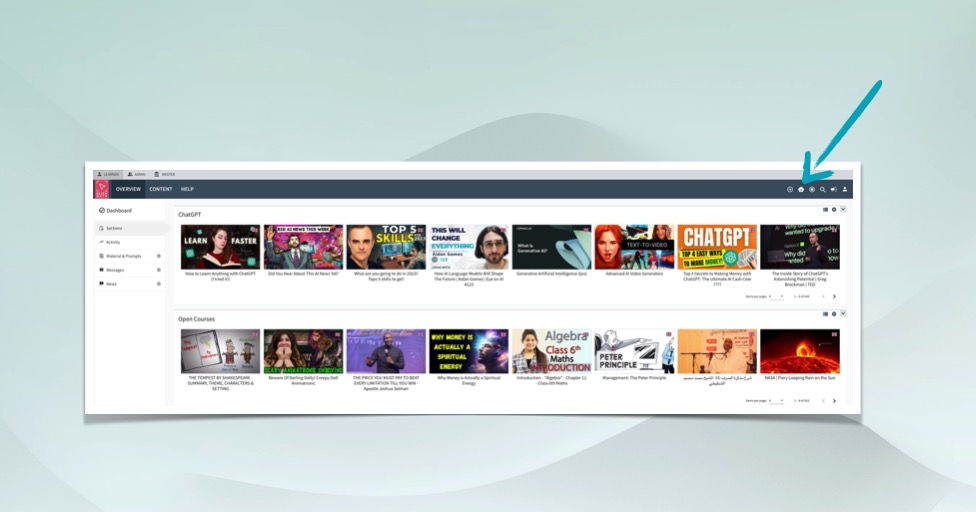
Create Chats in K3
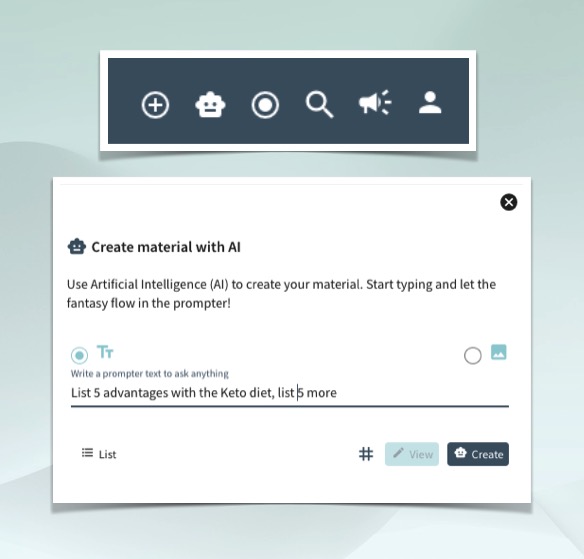
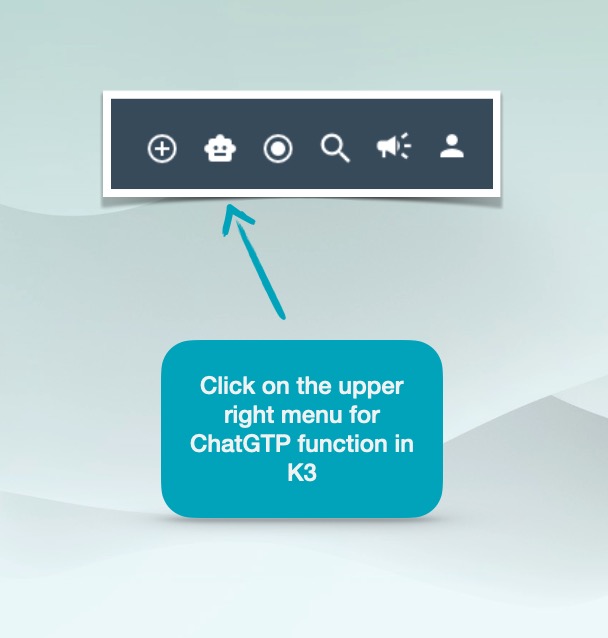
Once you have an account in K3, registered, and logged in, you will find the ChatGPT function in the upper right corner. The symbol looks like a muffin and a robot. Once you click on this symbol, you can send a request to OpenAI and type a prompt like you do in ChatGPT.
A slide-in will appear when you click on the Muffin symbol in the upper right menu. Write a request for the AI bot to reply. When you write on the line and send by clicking Create, K3 will handle all the backend with an API and deliver the reply to you in full when OpenAI is done. The View button will be lit when OpenAI delivers a full reply to the request that you prompted.
In the K3 Business Class version of ChatGPT, you find the ChatGPT function among many great features. Apart from the upgraded ChatGPT version, K3 is an online AI learning management platform with over 1000 great courses about AI and AI tools.

-
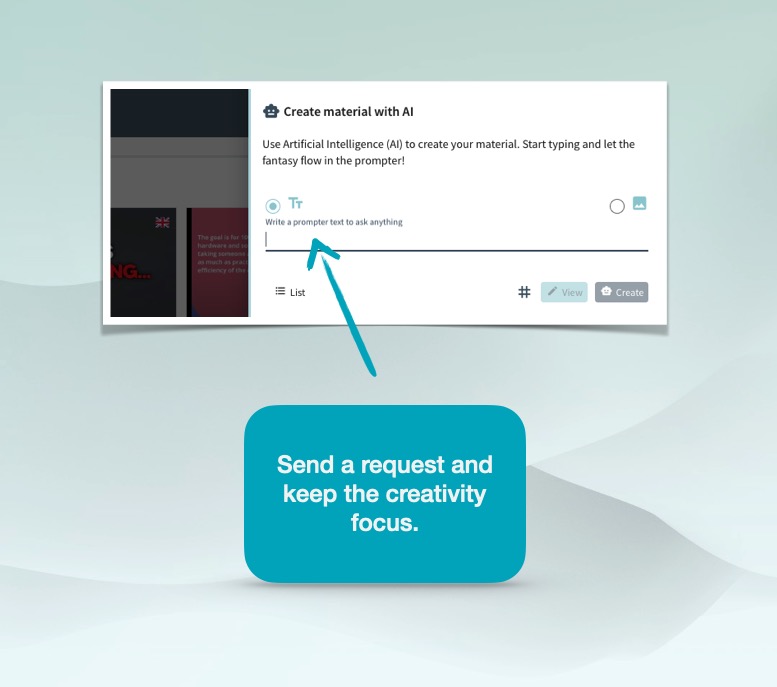
Send a request and wait for the butler - No telex replies
Create a Chat in Slide in and get released to do productive work while OpenAI works. In K3, you get an instant release to send a new one once you sent the first.
When you send a chat, you are often in the mood to find out something you would like to know more about or want the ChatGPT to do as an assistant.
When you are in this mood of creativity, you are most likely having more prompts in the fantasy flow.
We let you focus on creating great prompts without the interference of being disturbed by the replies. The interaction between the ChatGPT and your request is not to disturb you.
Hence, we dislike the "telex replies" and have replaced it with "served when ready." A butler will let you know when dinner is served; you don't need to be in the kitchen while cooking.
-

The View will lid when OpenAI is done
Receiving a full answer from ChatGPT and OpenAI takes a while. When it's done, the View will lid. Even if you have sent more chat requests, the View will lid when the first is completed.
When the View button is lit, you are ready to edit the reply without any copy & paste inside K3. The reply can now be translated, mailed, or printed with one click!
-

Go to list and see your chats
Click on the List button to take you to all your Chats.
You can go to List before the reply from ChatGPT is ready. So, this is a shortcut to the listings.
-
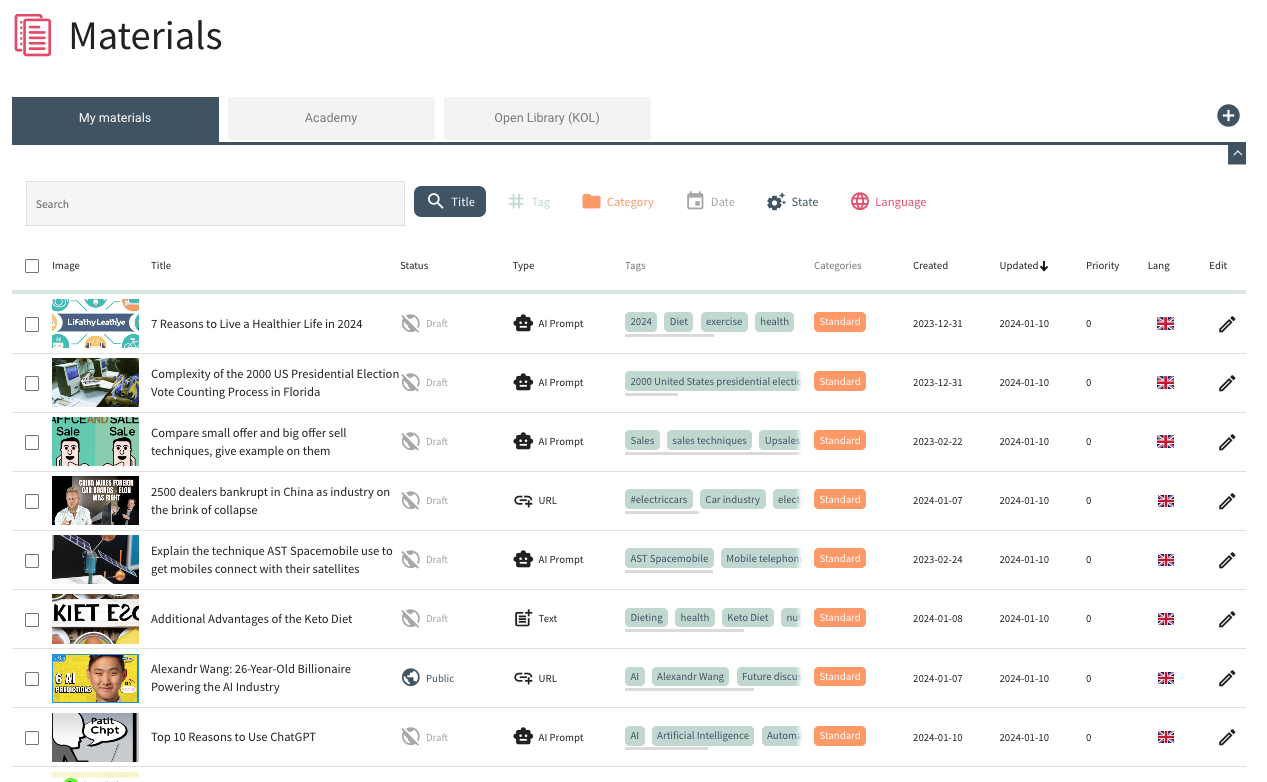
List all chats as Materials
In the K3 listing of Materials, you will see the chats you created, among other Materials.
You can view the content using the pen when you hover with the mouse.
Yes, the chats are easier to find, even with no search, since they all come with an AI-generated image viewed as a thumbnail in the Material listing. -
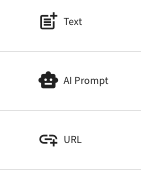
Type of Material
Apart from the AI-generated Material created by ChatGTP inside K3, you will find other types of Material in the list. Since K3 is much more than a better version of ChatGTP, we call the replies from ChatGTP Material. Material can later be a part of a Course.
You can paste a URL for later. Or a document. Or create an AI-generated image from the AI menu. Or upload images or Files. Or paste a Text you find useful and think you will use later. But let us stick to upgrading a better ChatGTP with K3 for now.
Note: Before ChatGPT has delivered a full reply in the backend and converted the Material to the AI Prompt type, the Material Type is called Text. -
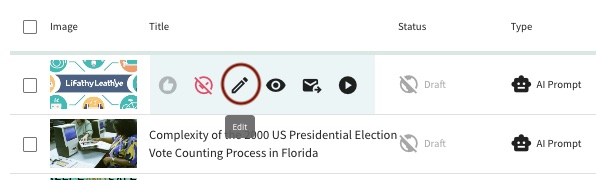
Hover to Edit with pen
When you find a Material you want to edit or read, hover the headline to find the pen or use the pen at the end of the row.
The last you created is chronologically at the top.
-
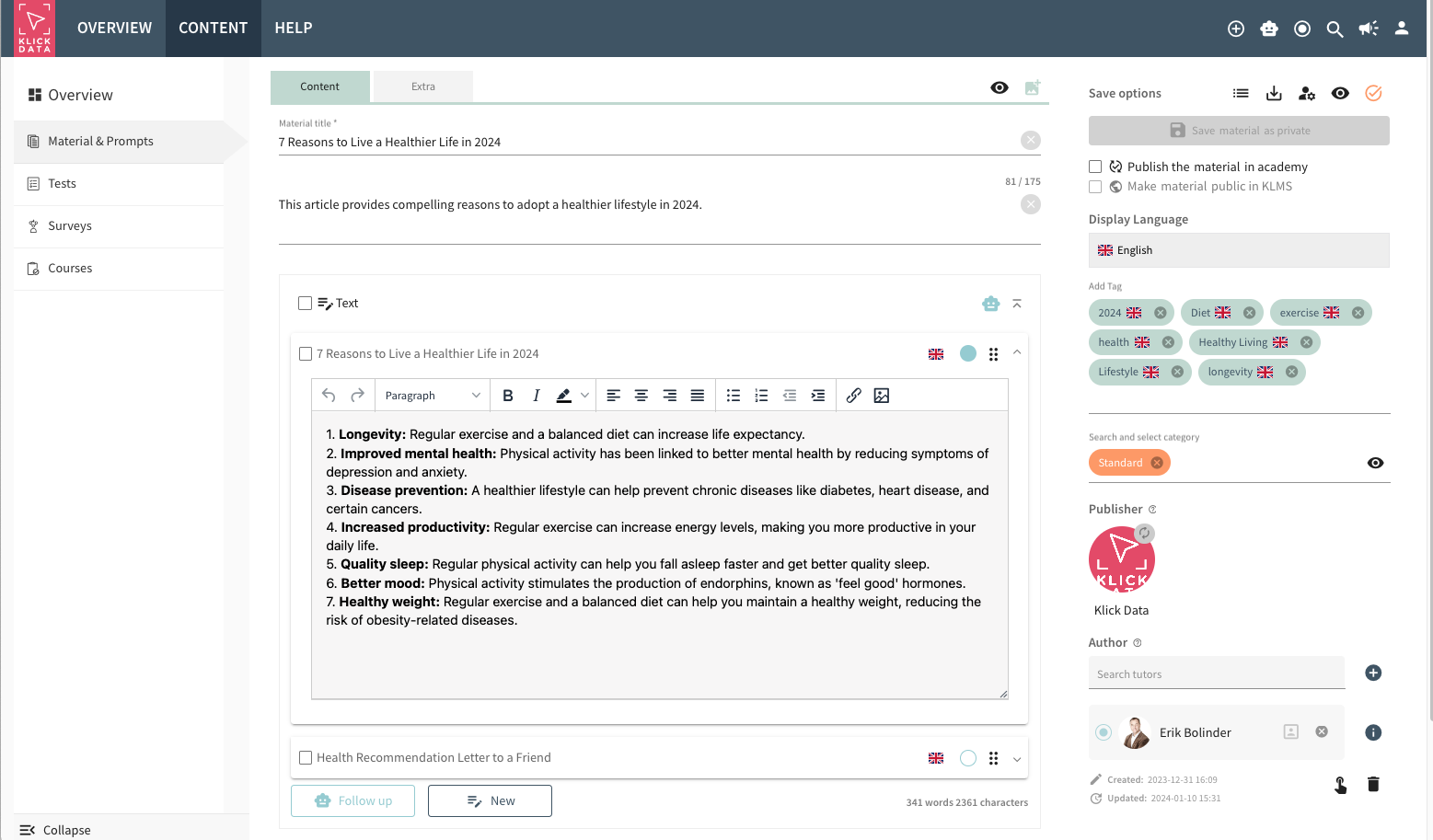
Edit the reply from ChatGPT in Material
When you click the View button in the Slide-in or from the pen from the Material List, you can read and edit the reply from ChatGPT directly.
No copy & paste is needed as you are used to from ChatGPT! You work directly in K3.
To Edit the reply from ChatGPT, just go to the Text block. Now you can do editorial and design changes like in any Word processor. -
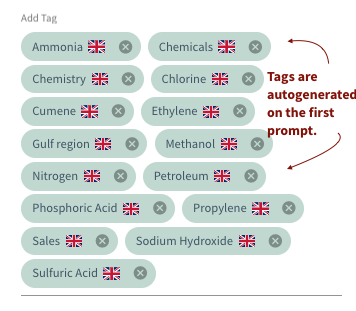
All chats are tagged and easy to find
And if you need to find something you did before with ChatGPT, there is no need to scroll as you probably are frustrated with ChatGPT (as we are).
All Material created with ChatGPT is automatically AI-tagged in K3. K3 search possibilities are endless.
K3 has eliminated this need for endless scrolling! Yes. We told you K3 was better when you are a ChatGPT user!
K3 is a system to boost your and your teams' productivity. -
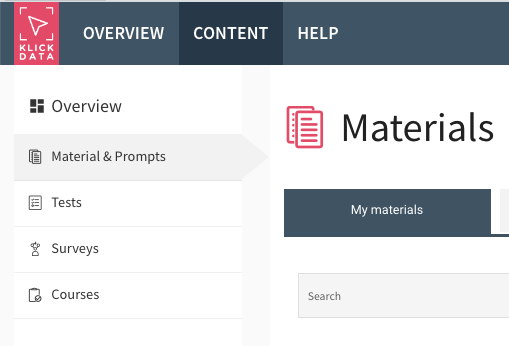
The AI prompt reply is automatically saved
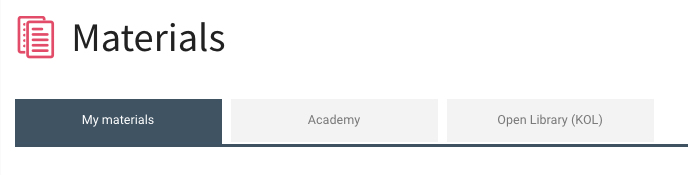
When ChatGPT has delivered a reply to your prompt request, the answer is automatically saved as Material in K3 under the My Material tab with no edit needed from your side.
You find each chat in the Material listing on the left menu bar. -
Material can be published to your team
If you work alone, K3 functionality with ChatGPT gives you superpowers to be productive when you produce information. You will enhance your output up to 10X with K3. And charge more for your hours to your clients.
K3 is an ecosystem not only for individual enhancement and efficiency.
K3 with ChatGPT functionality also boosts productivity within your organization. You and your teammates can publish Material to each other, build documents together, and convert them to courses. Inhouse or Public. Courses that you can charge and earn revenues from.
Everybody now has access to information. Knowledge is the possession of power. Knowledge is to be validated. Skills are to be acquired with the help of AI. K3 is a tool for this.Each material can be saved for the team inside an academy. Or Published as Public to all Academies in the K3 ecosystem. Hence, you see three tabs in Material with different content.
The ChatGPT function inside K3 is just a link in the Knowledge Network we call K3.

-

Use comma for follow up
Sending prompts often requires a follow-up question like "Please add more" or "Explain further."
This saves time in the creativity process. It seems like a small thing, but when you return to ChatGPT and leave the K3 Business Class, you will miss this function. If you type a comma you can ask for a follow-up question related to the first request like ”, More” or Explain further, ”List another 10”.
-
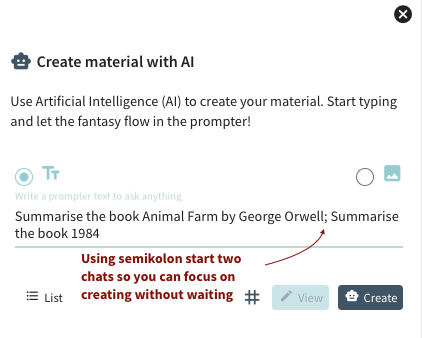
Create multiple chats with semi colon
K3 lets you send multiple prompts in the same request. You send two or more chats simultaneously by separating them with a semi-colon. It is as easy as that.
Using a semicolon in between chats lets you send a new question to OpenAI at the same time you send the first. Like giving a Dry Cleaner a bag of shirts. Instead of going there one by one each time.
Semicolons and commas save time when you prompt. -
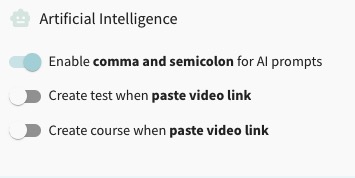
Setting on off for comma and semi colon
In the unlikelihood you don't like commas and semi colons; In K3 Personal Settings, you can allow to turn it off. If you for example paste a long text asking for ”a Summary”, you love the flexibility of this Setting.

-
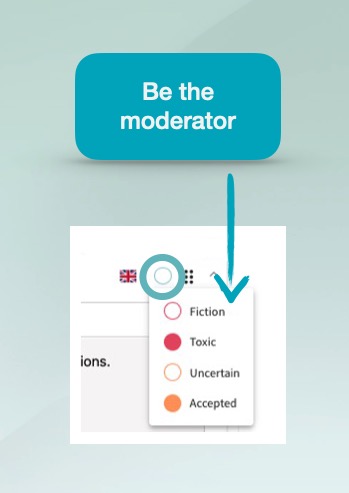
Mark text blocks as moderated
All texts generated by you or by AI have a label. Either it's pure AI generated from ChatGPT with no modification from you. You only with no ChatGTP involved. Or a mix.
It can originate from AI and be modified by you. It can be 100% written by you with no AI involved or translated. All these statuses are shown in a circle in each text block, so you know what type of text you are working with.
Validation of the AI content can then be marked by you as Fiction, Toxic, fiction, Uncertain (to be checked) or Accepted.
This is (most likely) going to be incorporated into all major software in 2024. Believing we were the first in 2023. This is based on our firm belief that you need reins to ride the horse (AI).
-
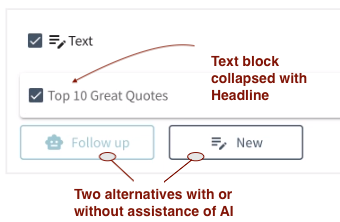
Write free without AI or follow-up with AI
A new Text block will be added if you click on New under a Text block. Anything you write here has no interaction with ChatGPT. It's a classical word processor or Notes.
Because you will not always have the need to ask AI when you are creating information in the creative process of writing.If you, on the other hand, click the Follow-up button, you will ask ChatGTP a new request, a "follow-up question",. ChatGTP will understand the context of your earlier prompt and the content in the text block and create a new text block that will appear when all information is sent. The Headline will be grey until done, and a new text block will be created with content from OpenAI (and an AI-generated Headline in this Text block).
And accordingly: This reply in the new Text block is editable the moment when you receive it.
No worries about the text block order. You drag and drop them super easy.
It is just like having a secretary or assistant to help you when you struggle with the text and information. If you make fiction or non-fiction, it does not matter. AI will assist you, but you can write as much as you like.One text block at a time. Then, you will later reorder and merge. Translate. Mail. Parts or in full. You will combine or split. And export. One or a few text blocks or the full Material.
Yes. Goodbye Word Processor from the past. The K3 Authoring Tool is great. This is the way you will work today and in the future. Others will for sure 100% copy us. Because it makes so much sense. -
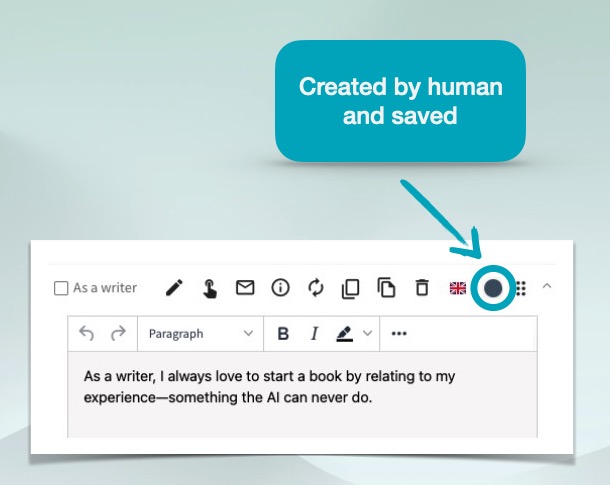
Black circle is purely made by you
The circle is black when you have written the text in a text block alone without any interaction or help from AI and ChatGPT. The full circle is saved. Unfilled black circle: Unsaved.
-
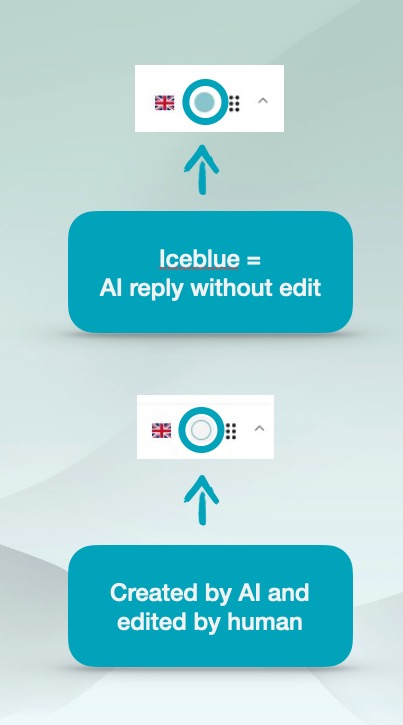
When AI is involved you will see it
When AI has produced the text block, you will see the circle on the upper right in the text block filled with an ice blue color.
If you edit the text block once originated from AI and ChatGPT, the ring will be transparent with the Ice blue border color.
Hence, you will always have the reins of what you have produced, AI produced, and what you have moderated. You will very soon get the greatness of this.
In February 2023, when we demonstrated this feature in K3, one professor from Oxford grabbed our CEO, Erik Bolinder, by the shoulders in Riyadh and shouted: GIVE THIS K3 TO ME! I NEED IT!!
-
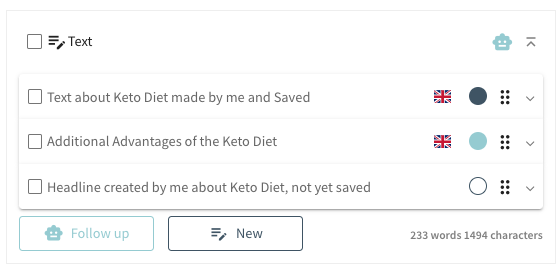
Each text block has a label.
You can mark each text block as a moderator. You also see what has been generated from you and from AI or if you have moderated the text.
Before you mark and moderate, there are color codes to differentiate text blocks created by AI or man-made. Or a mix.
Text blocks you wrote without interference with AI are marked as Black when saved or unfilled with a black ring when not saved. ChatGPT has not been involved here.When the text block has an ice blue color filled, AI generates this text block in full. If AI has generated the text and it has been generated by a human or you, the ring is unfilled with an ice-blue circle.
Hence, Black, unfilled black are human-made. Ice blue, filled or unfilled, is AI-made with or without the modification of humans.The other colors, orange filled, unfilled, red filled, or unfilled, are active marks from your side when you want to be sure if the text is okay.
So these eight (8) different rings to mark each text block all have a defined meaning to help you create valuable information based on text.

-
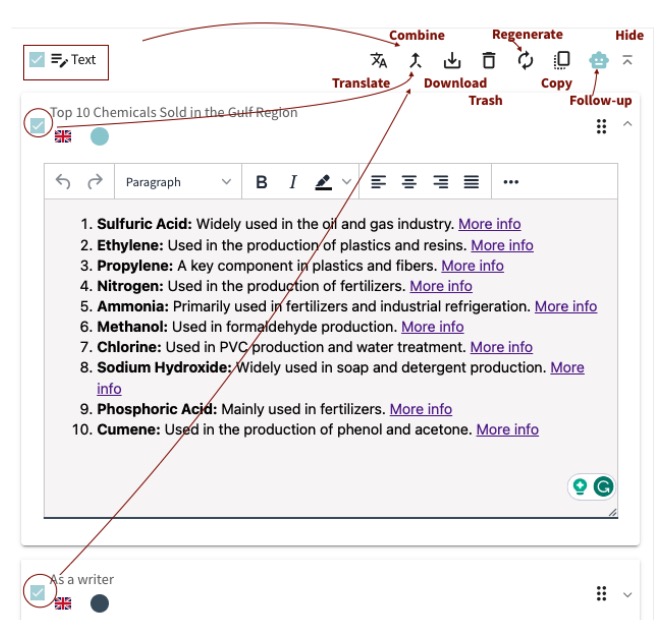
K3 is an authoring tool with multiple text blocks.
If you have scrolled so far: You realize the power of K3.
K3 is an authoring tool with ChatGPT as an assistant. Not the other way around. You are in charge of the content. You are the moderator.You edit. You mark what needs to be checked. You write. On your own or with the assistance of AI from the OpenAI large language model ChatGPT.
With K3, you are upgraded from the limitations of ChatGPT. Each text block is ruled and controlled by you. Not AI.
The first text block in a Material is created when you create a prompt request. You start from there. You can clean the text from spelling or grammatical errors. You can delete and change directly. Then, you can add more text blocks. And build a blog post, a report, or a book.
On your own mindset. When you need AI assistance, ChatGPT is there for you. By typing in Multiple text you can do so much more. Let us explain even more about the workflow now that you get the basics and what this means to boost you in your daily productivity!
-

K3 is an authoring tool with your best companion working together
Once you and AI inside the K3 Authoring tool with ChatGPT are a couple, you will never want to work alone with a Word Processor again. It is like Bjorn and Benny in ABBA or John and Paul in The Beatles. Your AI assistant works together with you in the creative process.
K3 gives you an upgrade to ChatGPT greatness. You will not go back.
in order for you to be creative
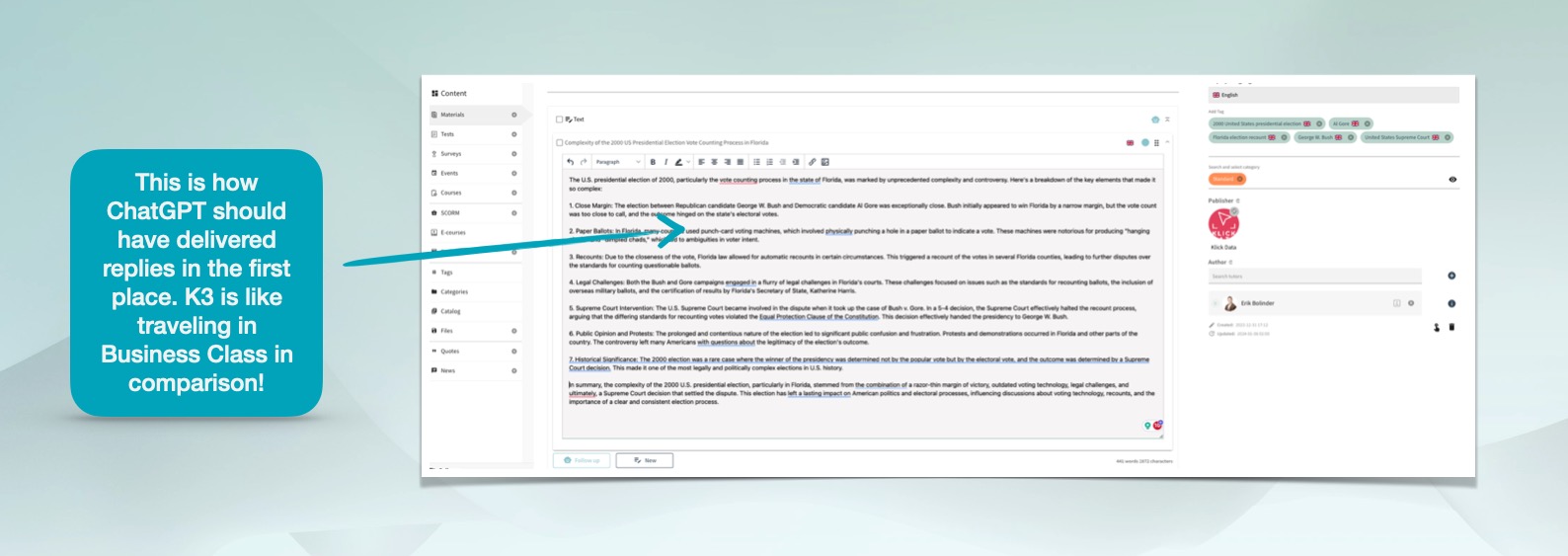
Chats become Material
A prompt request sent to OpenAI delivered as a reply will generate a chat in ChatGPT. Since K3 is so much more than just a delivery of replies from OpenAI: The chat reply from OpenAI is converted to a text block inside a Material.
We assume you will use ChatGPT as a tool when you create text material. Whether it's a blog post, tweet, essay, report or a book. K3 is the authoring tool and word processor on steroids for you. ChatGPT is your secretary and writing assistant.
K3 let AI generate so much more
than just the reply on your prompt.
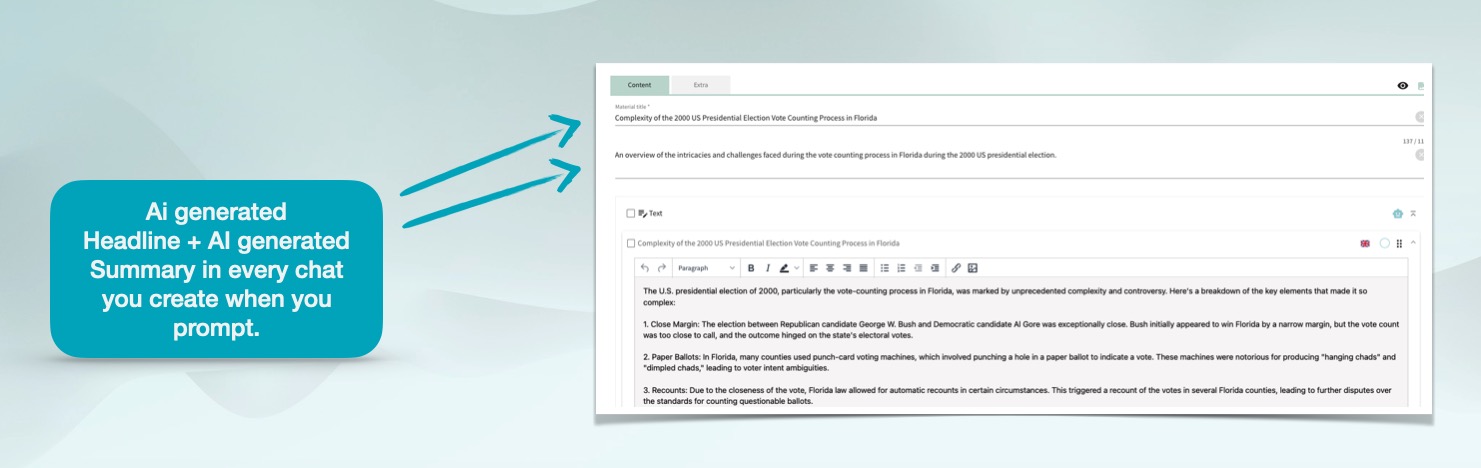
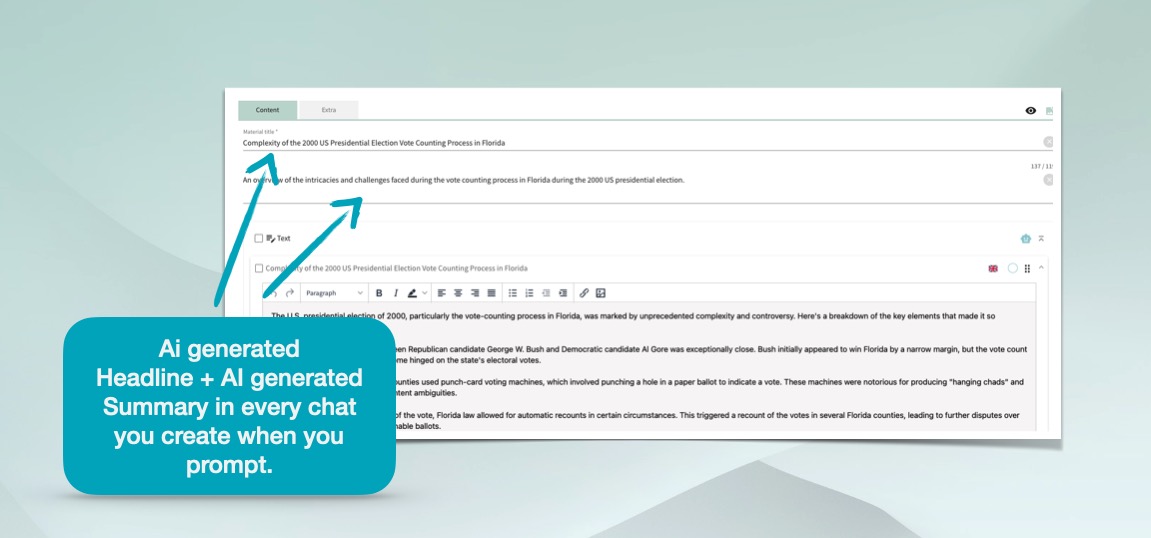
AI generated headline and summary
Every Material created with a prompt automatically gets a AI-generated headline. When a Chat is generated as a Material, we generate a Headline just as ChatGPT do. This Headline can be edited with the pen to fit your liking.
But K3 does more. We let AI autogenerate a Summary of the Chat reply. This can also be edited by you when you moderate.
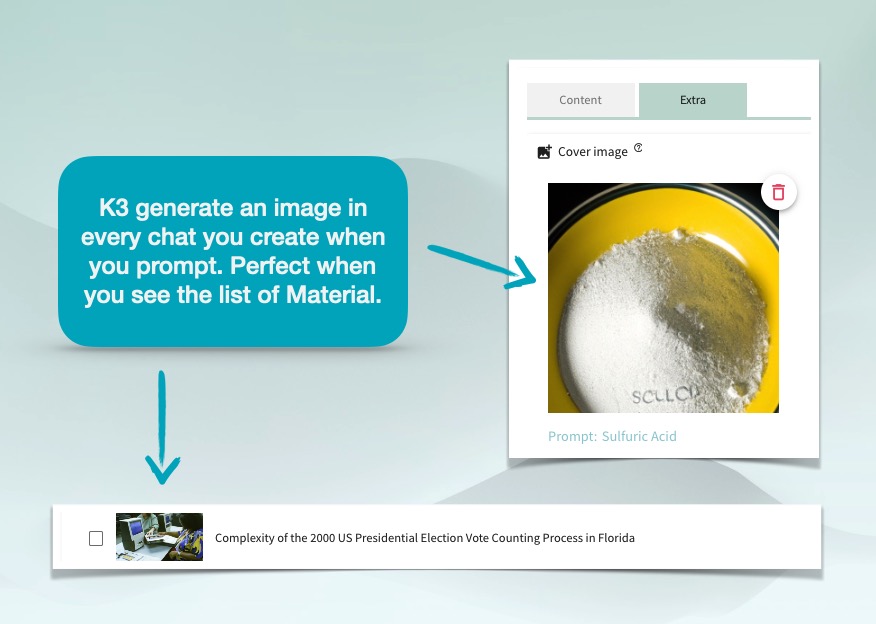
AI generated image
Every Material created with a prompt automatically will bring an image related to the prompt.
This might seem like an unnecessary thing until you realise how good it is when you go back and search.
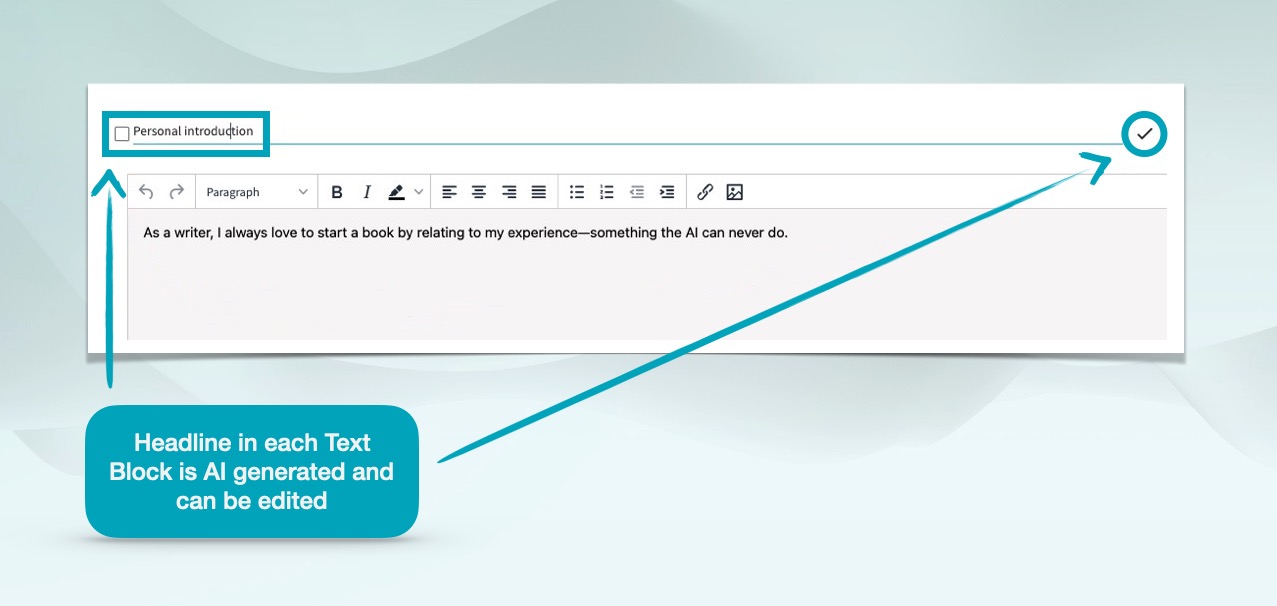
Headline on the textblocks
AI also generates a Headline on the text block on each request and follow-up question.
Why?
Because when you write a long document, these headlines are perfect when you combine the paragraphs into an article. This Headline can of course be edited with the pen to fit your liking. And you write it yourself in the manually created text blocks. In short, K3 is the perfect tool to write a book.
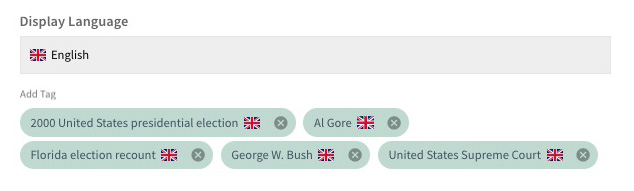
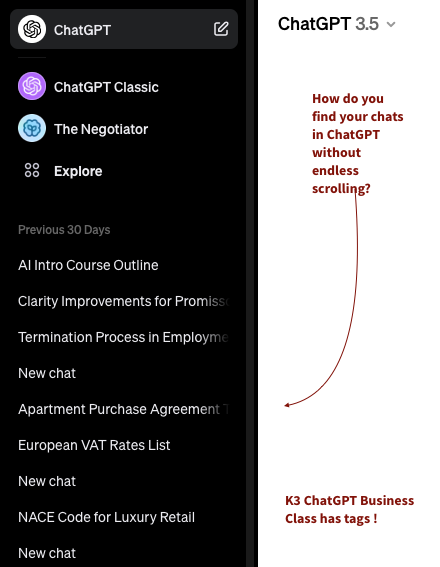
AI generated Tags so you find old chats easier
K3 also let AI generates tags on each prompt you send so you can find the content you worked with together with ChatGPT more easy than the endless scoll OpenAI leave you with in the left menu.
This timesaver is great. Trust us. And the filter system in K3 is top class.
-
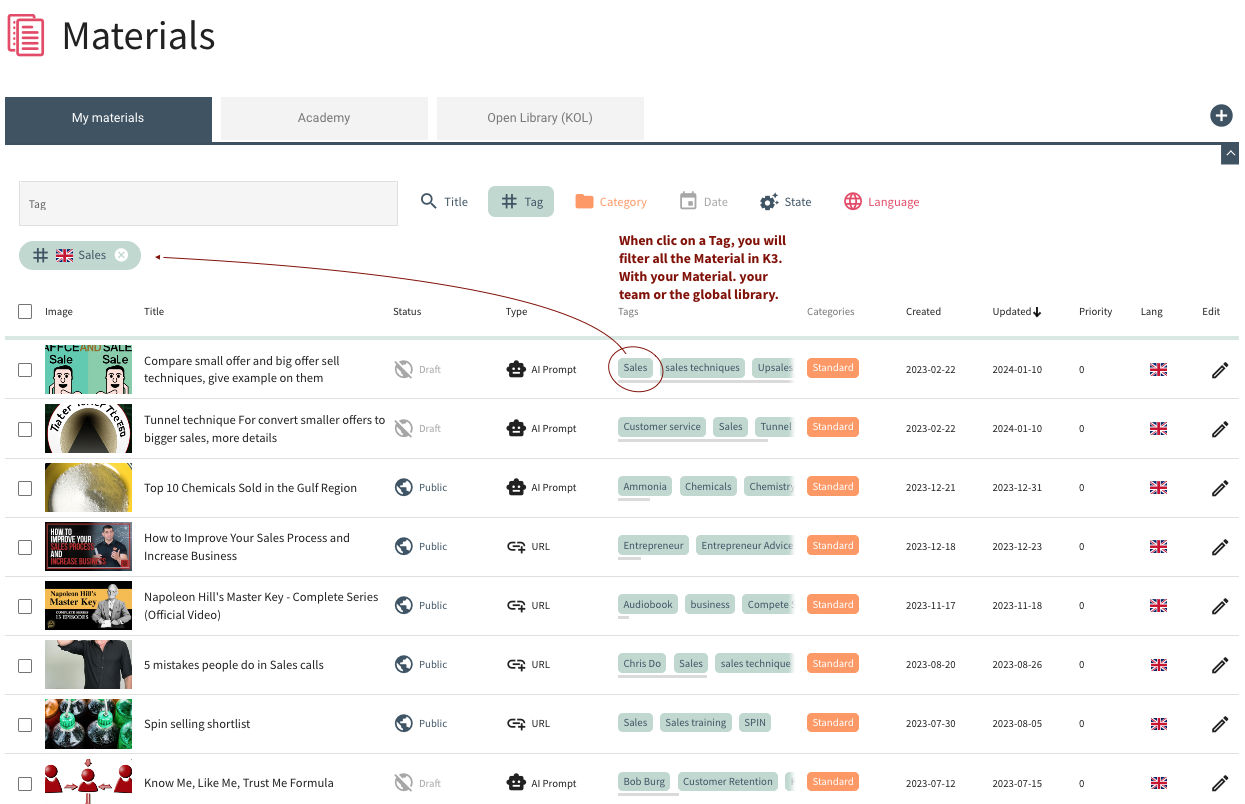
Clic on a Tag to Filter with one clic
Search among old chats in the Material by the Search tool or click on a tag to Filter with one click.
AI to help AI as an extra help
ChatGPT is a large language model that does not (yet) deliver perfect English. ChatGPT constantly improves, but during 2023, it delivered text that needed to be cleaned to improve the English.
Grammarly is an external AI service that many people use.
Hence, if you have Grammarly installed (not a K3 service), it will fix the text generated from AI to improve it without the copying and pasting that you otherwise would need. You do this instantly and will love it for the time it saves.
Believe us: We really recommend this add-on because the text generated with ChatGTP in K3 will be perfect in no time.
-
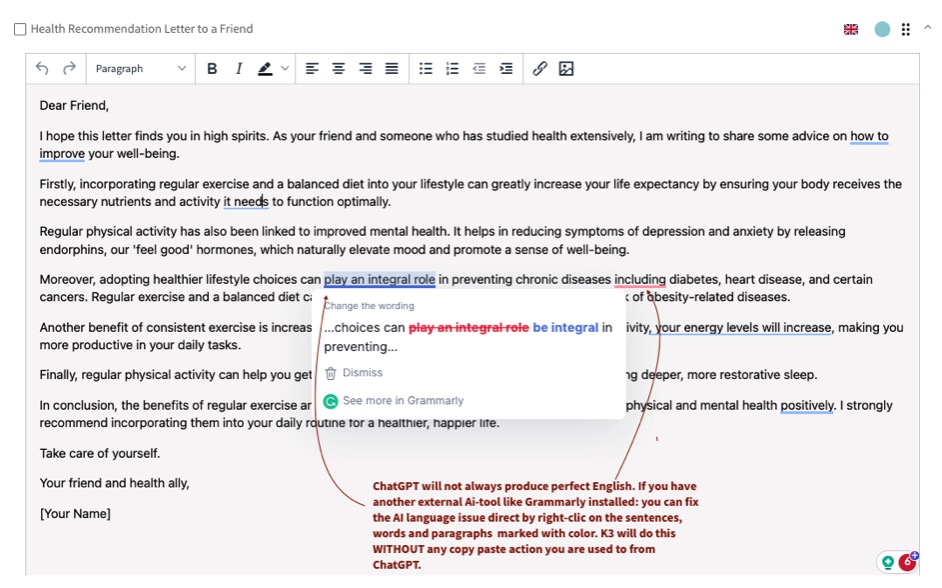
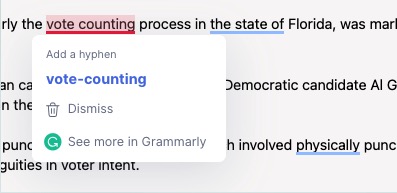
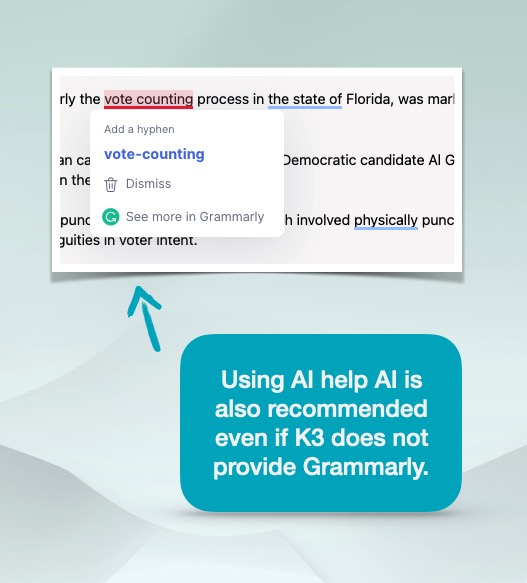
Right-click instant with Grammarly installed
Right-click directly to fix the spelling errors of ChatGPT with Grammarly, an AI function not included in the K3 service but an excellent tool for quality purposes.
You can fix the spelling issues generated by OpenAI without any delay. This is a huge time saver for moderation. With Grammarly in K3, you do the instant. No copy-paste is involved. It just works.
In the future, OpenAI will develop the grammar even better. Leaving the need for Grammarly behind. Hopefully. -
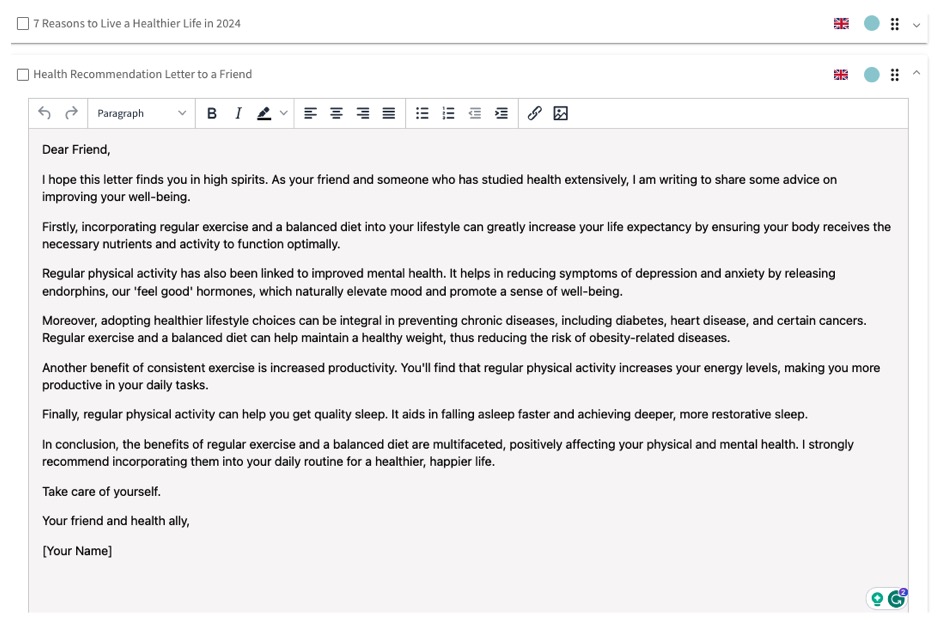
Spell cleaning easily done!
Cleaning with Grammarly takes no time! When you have cleaned the text in a few seconds, you have a perfect English text that is much better suited to mail, publish, translate, or post on social media.
You can do this with one click in K3. Don’t forget to moderate it with your own words.

-

Full control of the words
In the Material with many text blocks produced by AI or by you with or without edits. In K3 the number of words, characters, and tokens are counted in each Text block so you get an overview of the amount of text you are producing.
Your count will be summarised for the number of words and characters used. For web producers, content writers, authors, SEO optimizers, and tweeters: Counting words and characters counts.
In the K3 Business Class version of ChatGPT, all text blocks have an info sign that will give you the number of text with characters, words, and tokens used. The token is the amount of "energy or currency" used with ChatGPT, so you know how much your
-
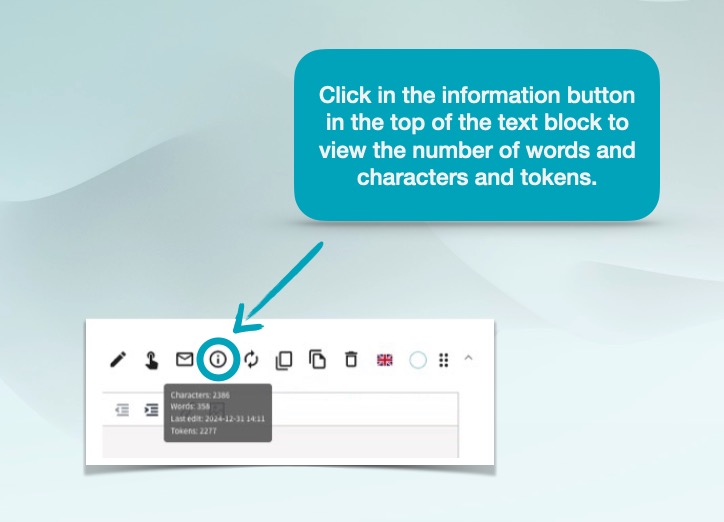
Info symbol show how much characters and words used in the Text block
Tokens, characters, and words are measured. Tokens are the currency you use from AI inside K3.
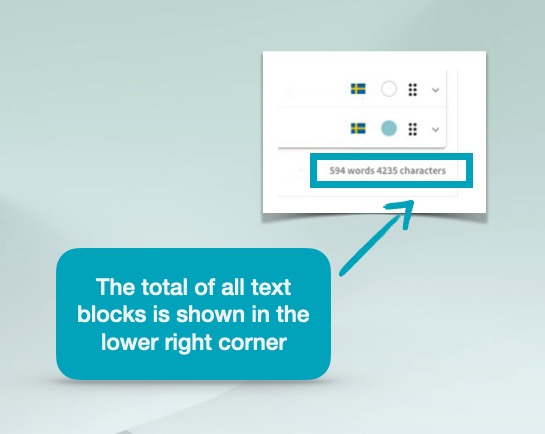
Lower end show all charachters and words in the Material
When you have multiple text blocks, you will see how many words and characters you have used in all text blocks.
When you write a report, book, blog, or journal, sentences become paragraphs; paragraphs become chapters, and chapters become documents.
When you need to export multiple materials to edit the design in one piece, You choose the Materials you have with the ease you wish the Big Techs would have done it already.

-
Export the Text and image from the Material
Each reply from ChatGPT will arrive in K3 as a Text Block. You can add more text blocks by asking follow-up questions to the ChatGPT AI bot or by writing new Text blocks on your own.
This interaction makes the K3 Business Class version a great Authoring tool. You can write a book with this K3 tool and always have AI assistance.
-
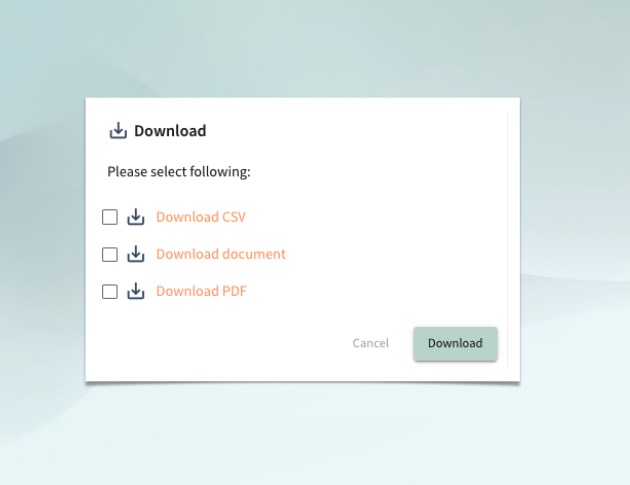
Export Text block to PDF, Doc/Text or CSV
Working with ChatGPT in K3 is good enough for most people, but exporting to Word, PDF, and CSV makes a lot of sense for most organizations.
Depending on how you like the Material, you have three options. CSV, Document, and PDF
-
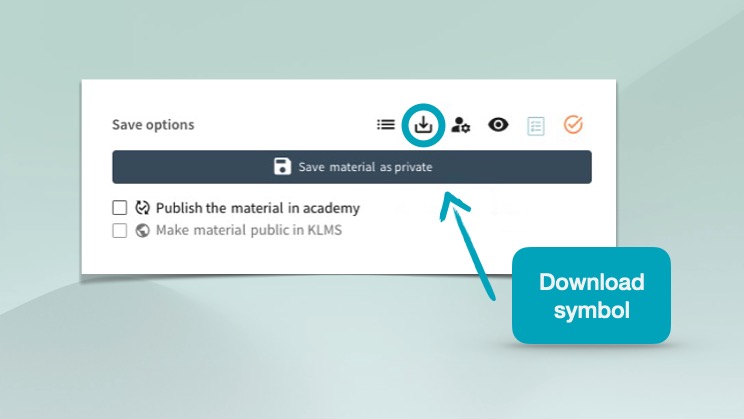
Mark the Textblocks before export
You can checkmark all text blocks at the top of the Textblocks. Before you export, you can merge several Text blocks into one.

-
Regenerate with edits is a normal ChatGPT function
We just made it better by adding all generated questions easy at hand so you can go back and edit some previous great ones or copy to make tweaks.
Another observation we made is that regenerating a reply in ChatGTP erases the first.
Do you know if the second is better? Before you regenerate? Of course not. The way you do it in ChatGTP is that you copy and paste it somewhere in Notes, Skype Chat, Word, or Evernote before you regenerate, just in case the first would be better than the regenerated request. This is not needed in K3. You click Duplicate Text Block, and then you regenerate. So, the first reply is saved.K3 is just better than ChatGPT when you start using it. And you will soon be an addicted power user of K3.
-

Create a Follow-up question
Click on Follow-up and write a new prompt request.
-
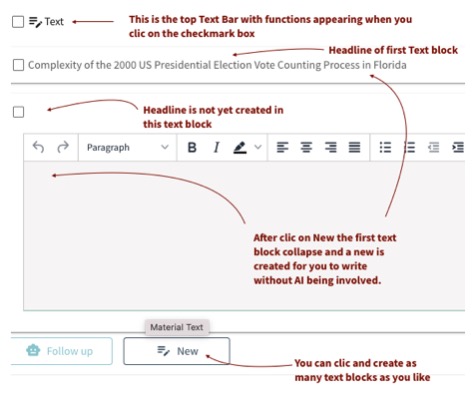
Write free text without interaction with AI and ChapGPT
When you click on New: A new blank Text block will appear beneath the last, and you will write whatever you need with the built-in text editor. AI will not be involved in the creative process.
-
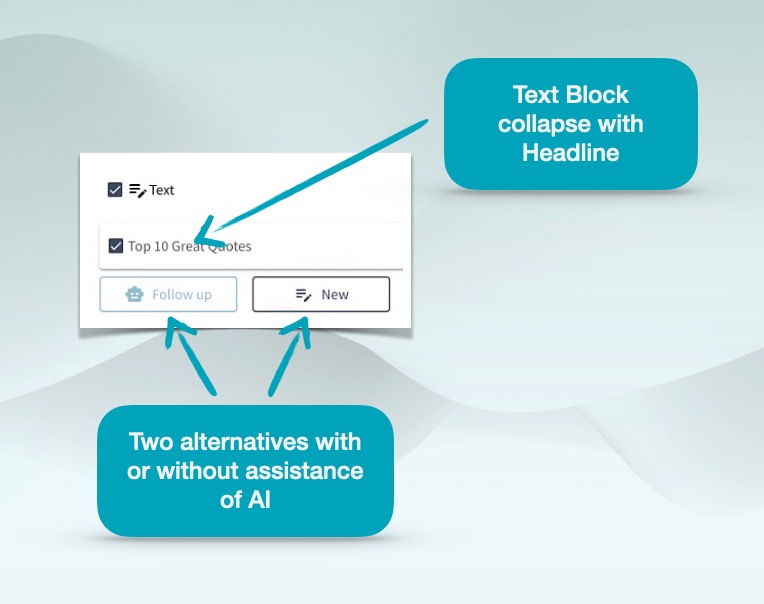
Follow-up or write your own Text Block
If AI is your butler, you decide if ChatGPT or you will write the text.
In K3, you have the option. With the Follow-up button, you send a new request with a prompt to OpenAI through K3 and will get a text block back. With the New button, You write yourself without the interaction with AI.
All of us writing documents know that these options are great, and you will use these functions and buttons extensively.
-
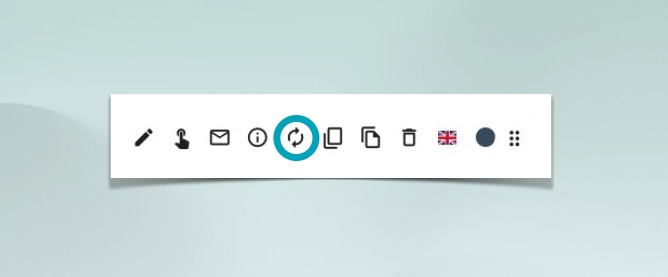
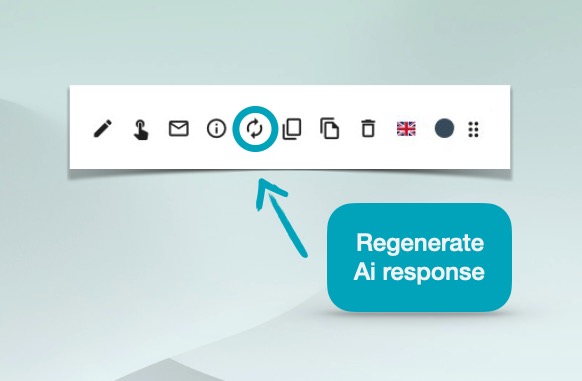
The regenerate button
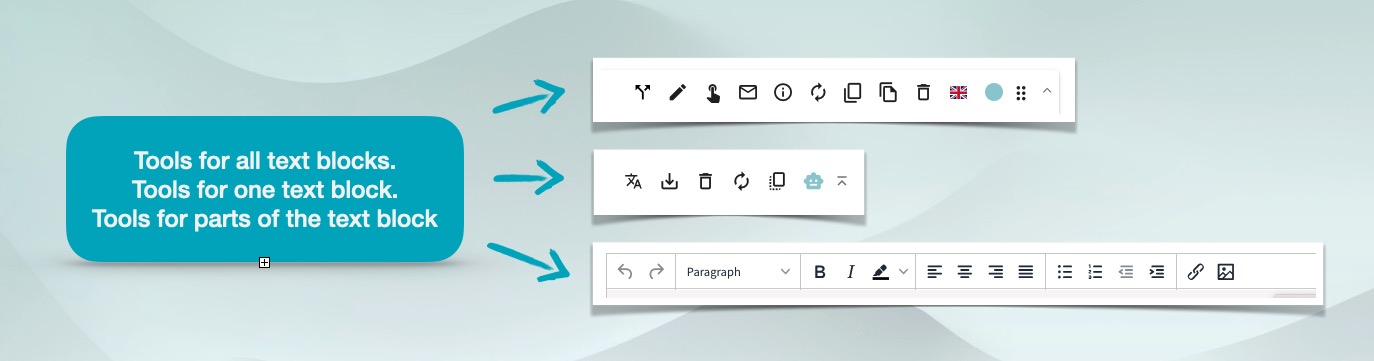
Click on the regenerate button in the Text Block Top menu
K3 has edit, reorder, translate, split, combine, download and send email.
ChatGPT has not.
Shall we go on comparing? Or do we already have a winner? Order today.

-
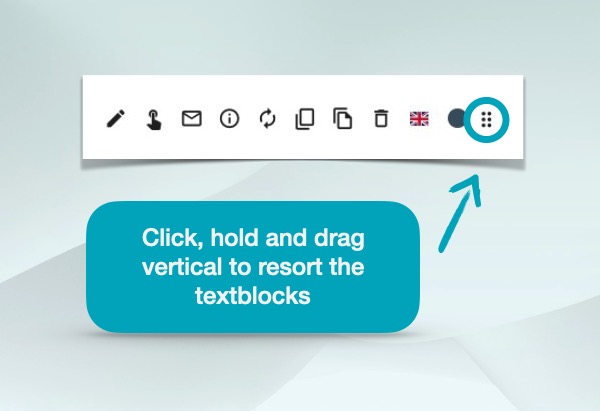
Text block reorder
Text blocks can be sorted, so getting them in the right order is easy.
When you create any document, contract, report, blog post, or book you will find K3 text block functions as your core tools on a daily basis.
You will find the feeling of going back to ChatGPT as in the days before smartphone existed.
-

Mark text block and merge
Before you translate, split or export: Text blocks can be merged and combined.
-
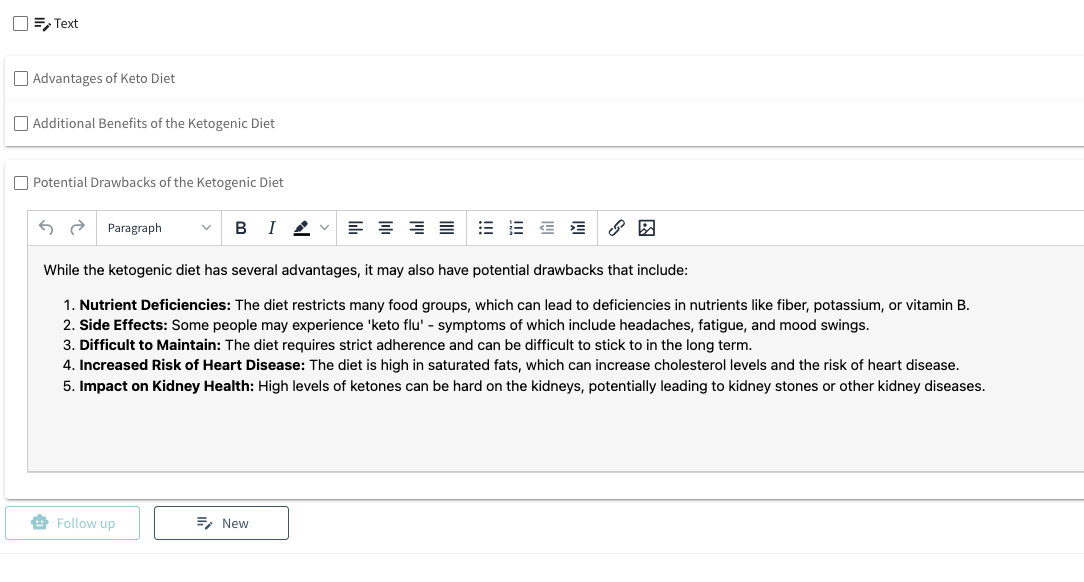
Edit design inside each Text block
Inside a text block, you have all the tools you are used to when you edit text in a word processor. The reply from ChatGTP can be edited to fit the design you like. Bold, Italics, Underline. Colored. Bullet points. Etc.
-

Duplicate text block with translate function
When you work with multiple languages, you will love the translation function, which allows you to create a text block with one click and dropdown without the hassle of going to Google Translate and Copy-paste and then copy-paste back the translation from Google.
Or sending a follow-up question to ChatGTP in the hope these translations are good enough quality, knowing that you most of the time need Grammarly to fix the English. The moderation possibilities in K3 are essential in this process.
The small time-saving details like this will make you love K3. -
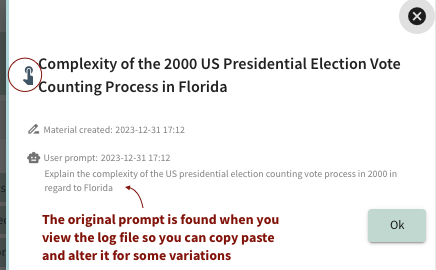
Original prompt is saved
Since K3 takes your prompt and delivers the request from ChatGPT and does lots more, like with the help of AI creating a Material Headline, Material introduction, Text block headline, image, and tags, the original request you sent to ChatGTP is refined and "forgotten" in this process.
But we understand you might need it again and tweak it, so you will find it by clicking on the finger symbol in the 3rd column. The slide-in will show it to you. And you can mark and copy the text if you want to reuse it without rewriting it.
-
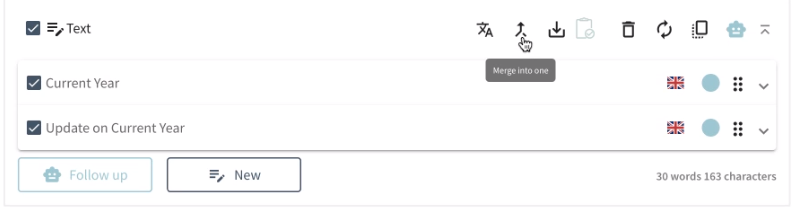
Merge text blocks into one
You can merge text blocks into one with the Merge tool. You will get the text block content and the Headlines from the Text block into one new Text block that will appear below the ones you leave unchecked.
-
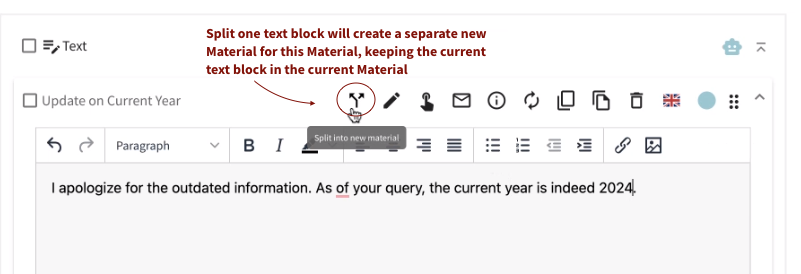
Split Text blocks
You will eventually have the need to split text blocks into new Materials. Just mark one or multiple text blocks and split them by duplicating these text blocks in separate Materials.
Split the Text block into multiple Materials and then decide if you want to delete them in the current material. -
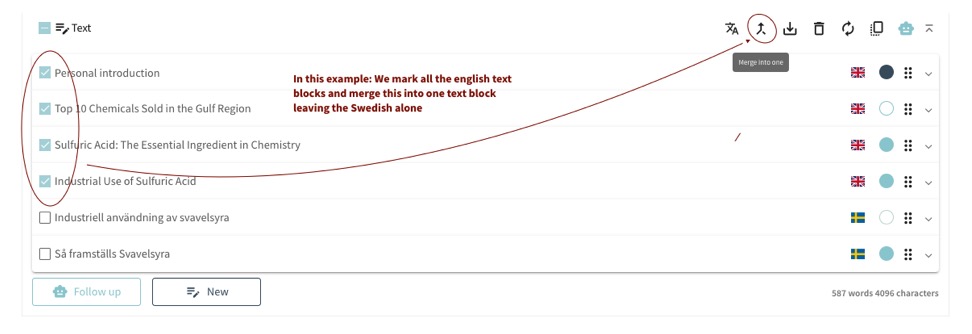
Uncheck text blocks
Uncheck text blocks you don't want to be included in the joined Text block. In this example; we have left the Swedish Text blocks out.
-

Chevrons let you get an overview of your content
One prompt generates a text block. A new follow-up generates another text block. You wrote a text independently without any interaction in the third text block. Then you let AI add a fourth. Then, you reorder by dragging a text block to the top and rewrite a headline not generated by AI to your liking. You translate, combine, and split. The creative process continues, and you are in the flow!
With many text blocks in the single Material, It's easy to lose track of the overview. You can hide each text block's content and view the header to overview. Or open up all to review them before you combine them.A few characters becomes a Word. Words into sentences. Sentences into paragraphs. Paragraphs into chapters. Chapters into an essay and a report. Or even a book. The creative process is at your fingertips with the integrated ChatGPT in the K3 Authoring Tool.
This presentation of K3 has been a joy to produce.
Because we love K3 even more than we love ChatGPT. Because we know it will boost your productivity, just as it has boosted ours. We hope you will join our community and share the joy. Order your K3 license today!
- Details
- Written by: Chris
- Category: Standard
- Hits: 2447
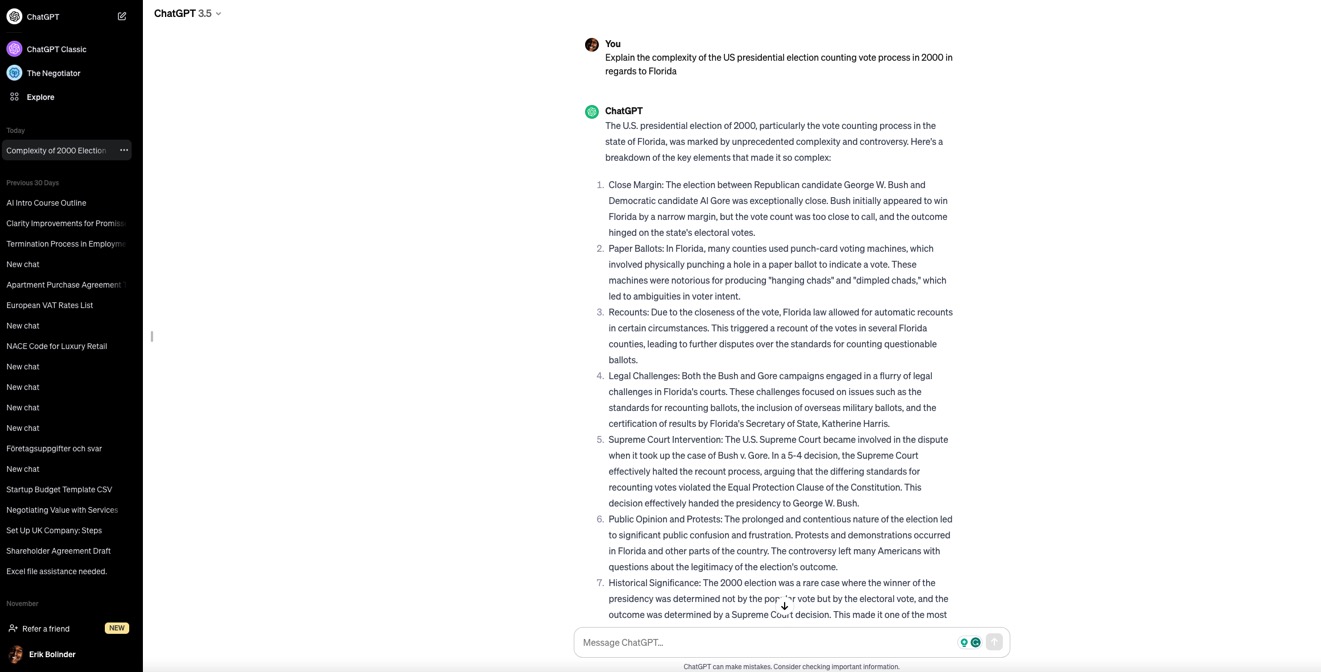

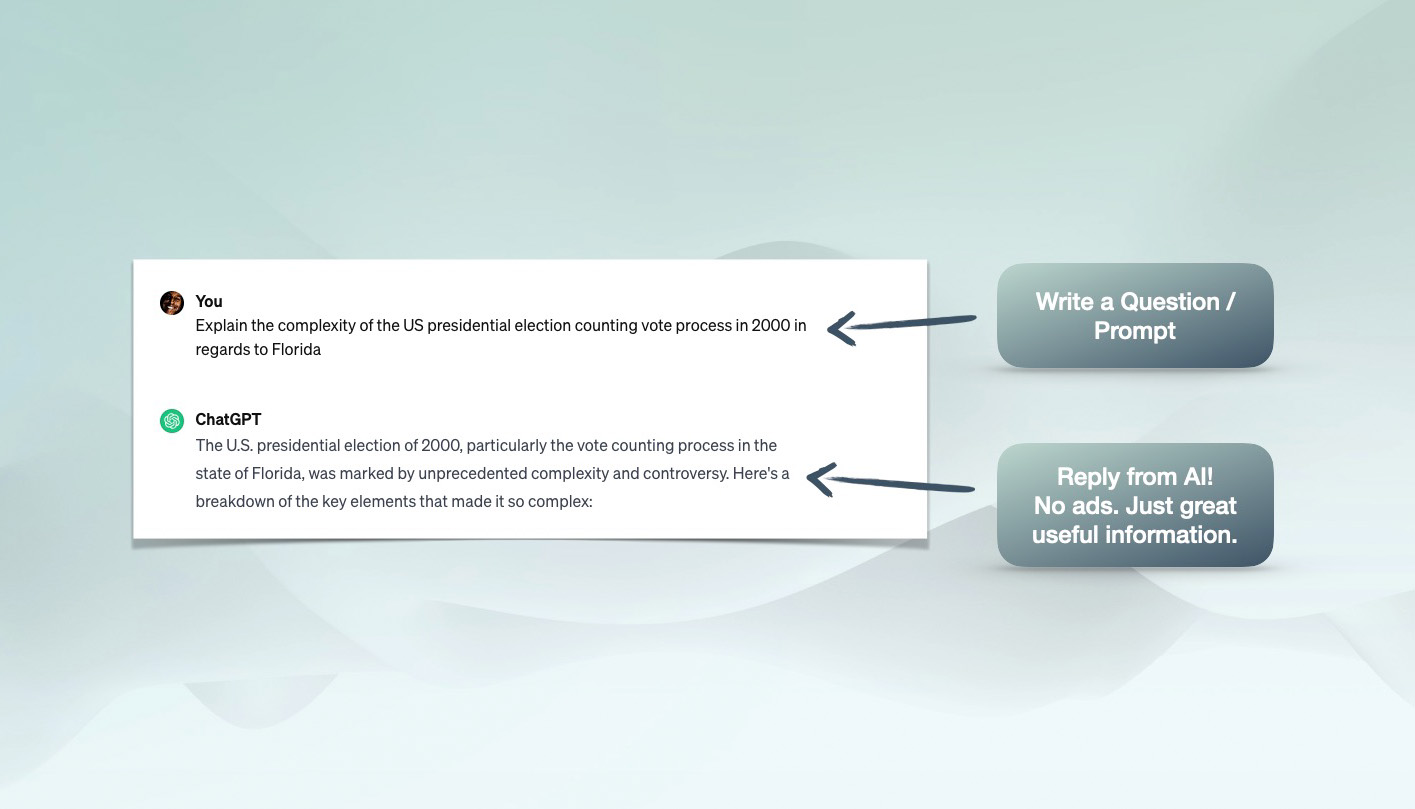

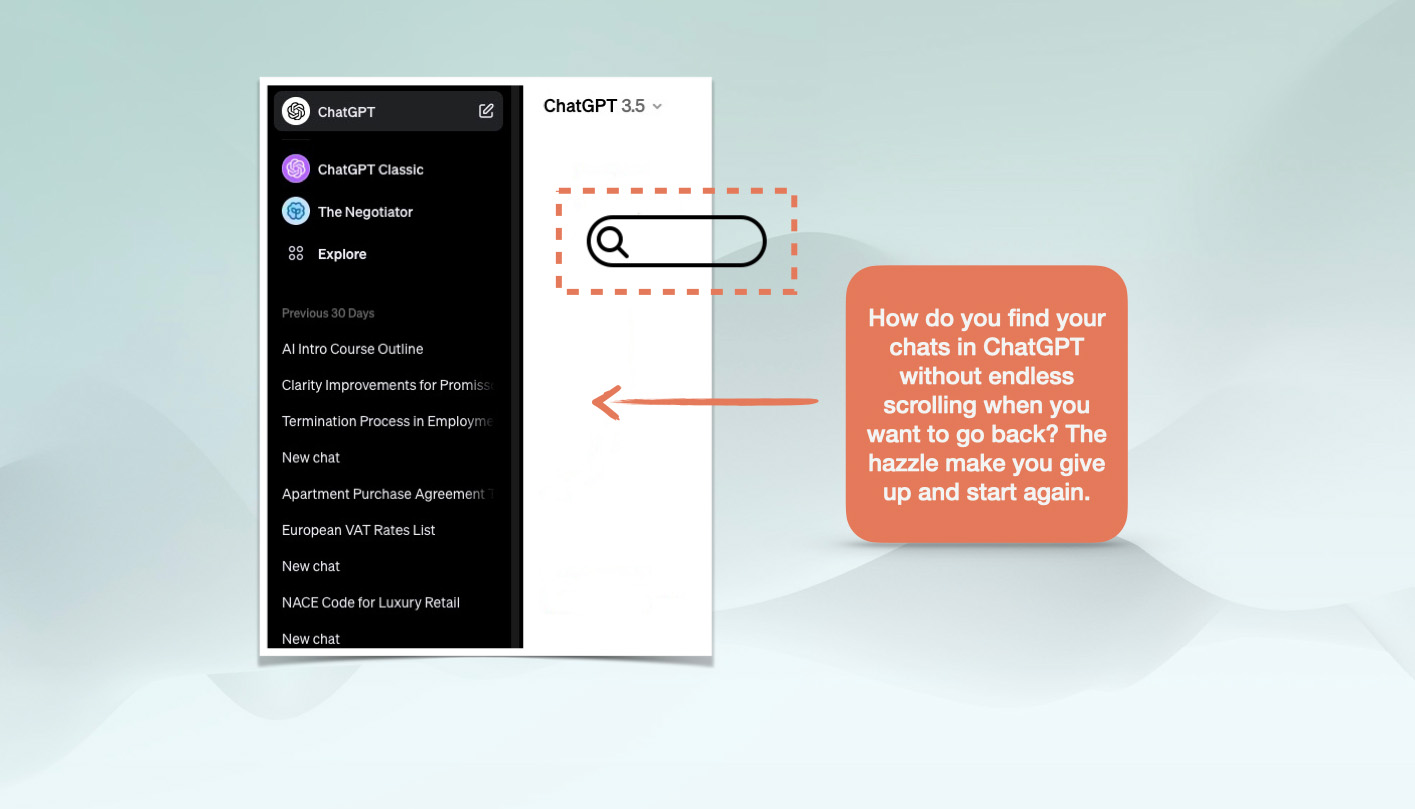
Yet. We had some issues with the UX. With the functionality. With the lack of productivity tools.
We set the target to fix it.


We asked ourselves: Why and What if ?

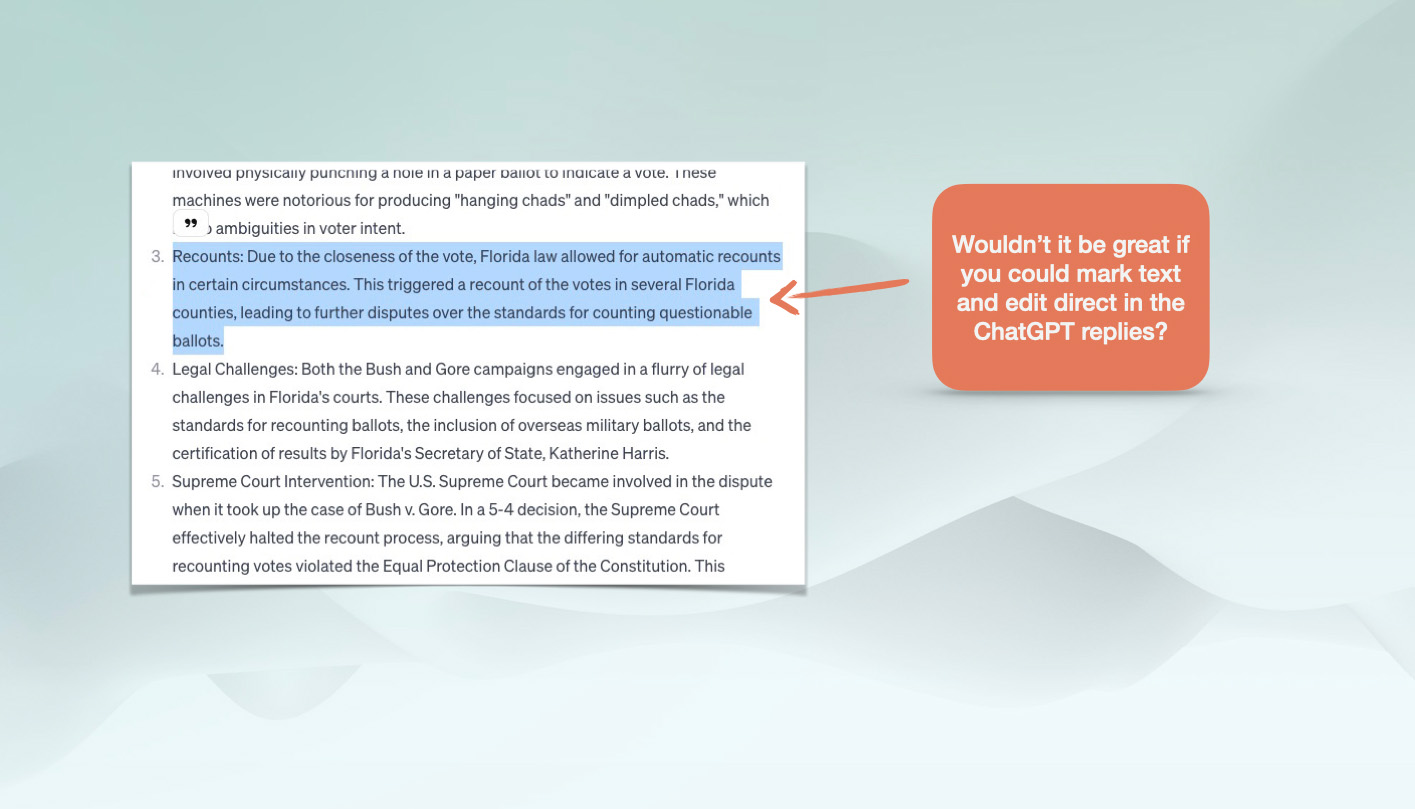
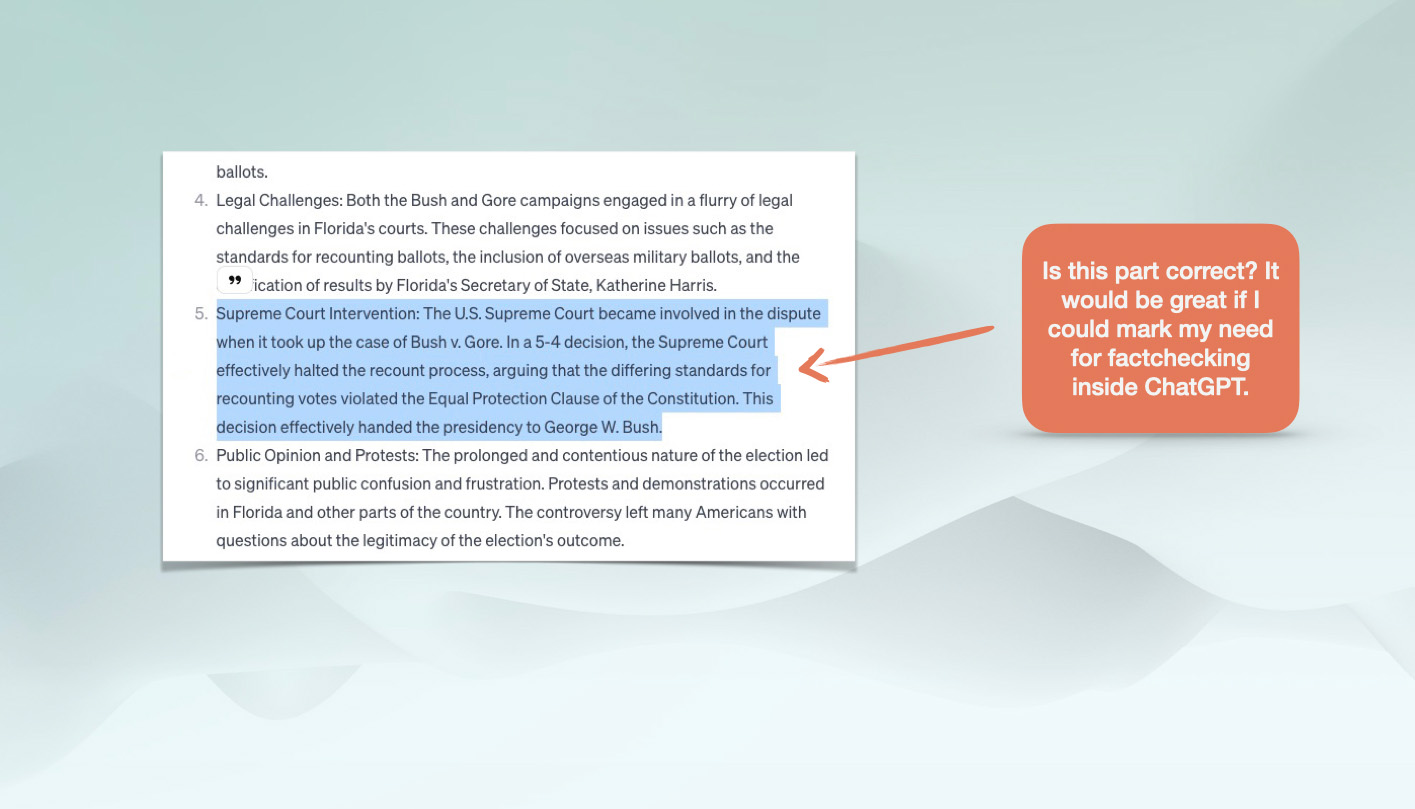

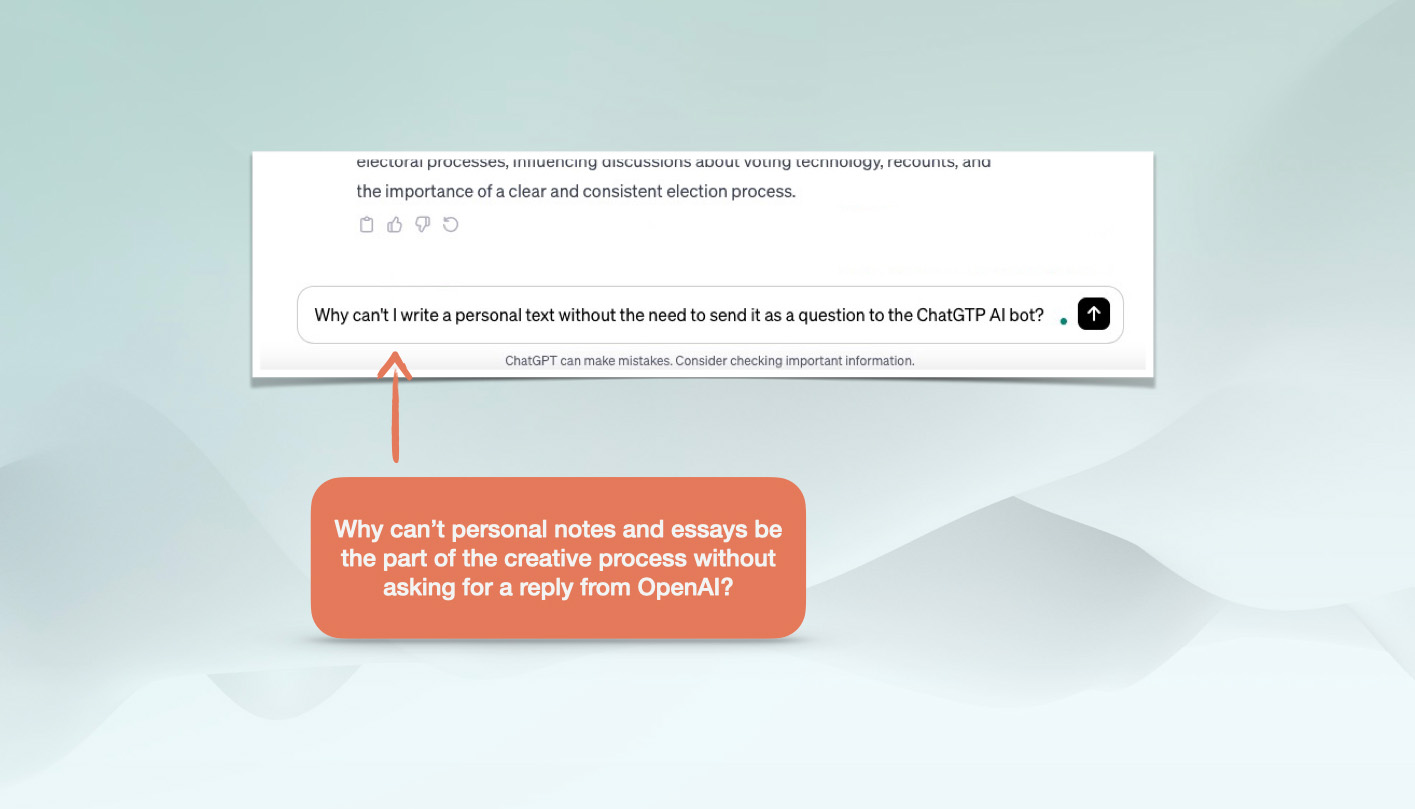

Why can’t I make this paragraph in bold, italics or underline?


What if could translate a reply with one button from a dropdown?


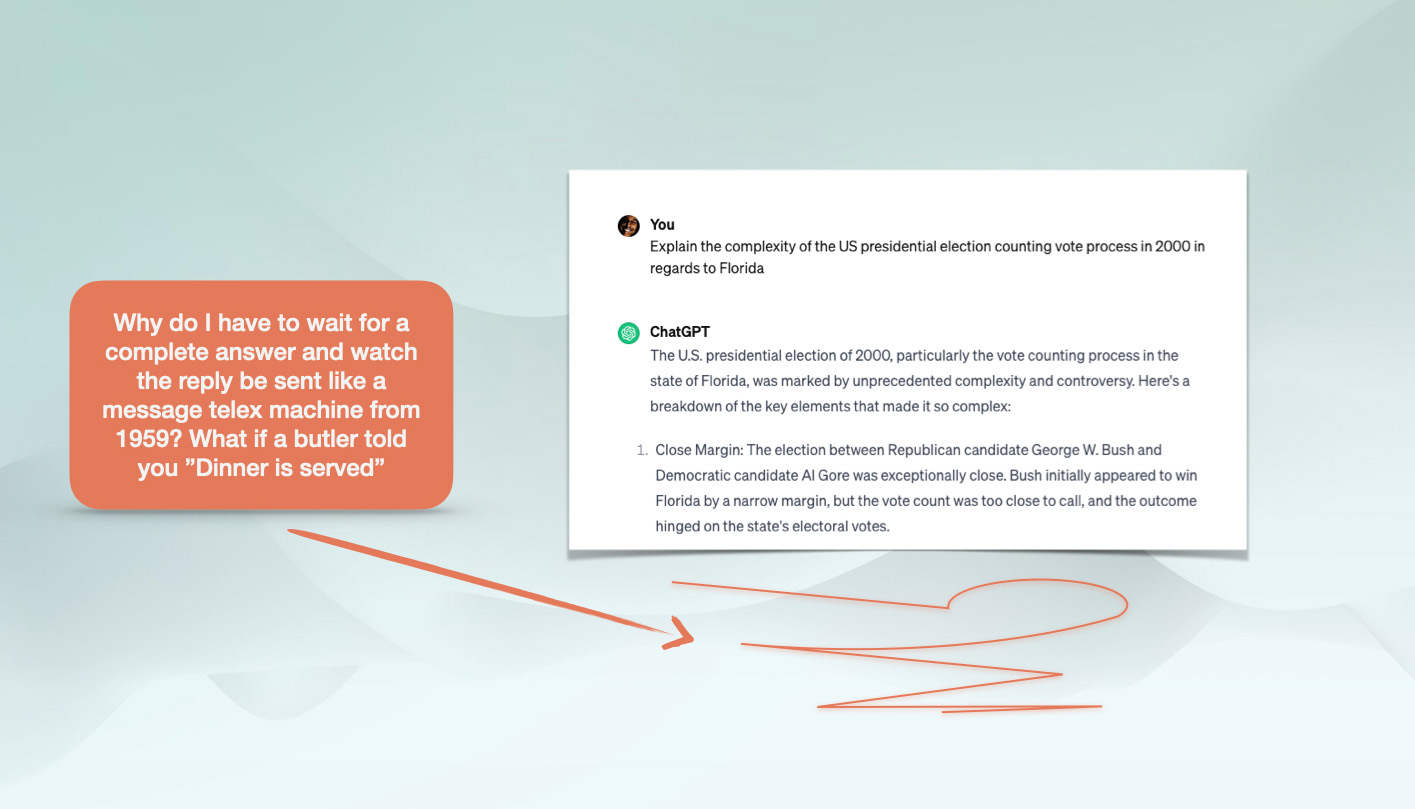

- Details
- Written by: Chris
- Category: Standard
- Hits: 105
Chat.K3.io
ChatGPT is the most astonishing thing Internet has seen in 25 years since Google was introduced. It will change everything! 1 million in 5 days.
100 million users in 10 weeks! Wow! 1 billion before summer?
Well! We are all amazed ... but let us introduce an upgrade!
Let us introduce a Business Class version of ChatGPT that you will be even more amazed about!

Would you rather sit in the Business Class section or would you sit in Economy when you do your prompts?
Let us give you
10 GREAT reasons
you should upgrade to ChatGPT to a Business Class version!
Here are some GREAT functions we have added on top of ChatGPT!
1. Always access!

We have a backdoor to ChatGPT when ChatGPT is down for public. Yes: We will give you answers on your prompts even if ChatGPT is down and the AI just produce a poem and ask you to return back. This is a good enough reason to upgrade with a one time fee right there!
How do we have "always access"?
Our access and "backdoor"? It's not magic: We use the API that the OpenAI project offers, allowing the service to be accessible even if the main gate is closed. On rare occasions, this API is closed for us also, but on a ratio of 1:100. We have all seen the Come Back Soon sign all too often due to the tremendous success ChatGPT has had.

2. Valet parking
Leave and come back when done. We like the ChatGPT experience with prompts to be like leaving a car key to a valet parking, and not as a putting plastic bottle in the return station one by one. The backend shall take care of it and leave you doing something else. Like, type a new prompt instant!
What do we mean by "Valet Parking"?
We loved the telex prompter ChatGTP has when the bot answered for 15 minutes the first time we tried ChatGPT. Then we just felt it was a vaste of time and weak UX. Why wait?
We did not want to stand there as putting plastic bottle (prompts) at the return station one by one. We wanted ChatGTP work like Valet Parking.
We wanted the ChatGTP be like you give the keys to the consirge at the five star hotel entrance and and he parks the car for you while you go to the hotel room or jump in the hot jaccucci.
So technically: We will take care of the prompts you send and then we communicate with ChatGTP in the backend. When we are done with this, we lid a View button so you are aware the reply from ChatGTP is ready in full and we have "parked the car".
In the meantime backend works, you probably have produced lots of other prompts or tweaked the first or edited an old chat.
By this ChatGPT Business Class solution you have leveled your productivity 10X. We promise this will make the value worth the first day you try this. Its addictive! Ask any of your friends who tried this. They will tell you its way better than Bing or ChatGTP. This is VIP treatment for the elite.
We are used to the best and so are you.
3. ChatGPT as the
Dry Cleaner
One by one or a bag full of prompts. When you leave your suit at the dry cleaner: The dry cleaner gives you a receipt and you come back when it's done. And a dry cleaner would accept 10 shirts in one bag.
How can we be different than ChatGTP with the prompts?
At the plastic bottle return station, you need to send the (prompts) one by one. Yes. We do this one by one just as anyone else. But YOU dont have to send them one by one. Our backend do this. Just as the Dry cleaner staff iron your shirts when you are not there. You do not need to watch them do this.
You can leave one request as ChatGTP and one shirt for cleaning at the Dry Cleaner. But you can leave two simultaneously (prompts + follow-up). Or a full bag (CSV batch with questions in a table).
No waiting for "the machine" to be ready before you can send new (prompts). So we let you send multiple prompts in one prompt and follow-up questions with semicolons and commas as separators.
This will 10X your Productivity, and you can have assistants or AI bots creating the prompts and then send them to us for a batch. And we deliver them "cleaned," "ironed," and "folded."
We even IMPORT CSV files if you like to send a batch. Yes! We are not kidding. We told you this is the Business Class version of ChatGPT! Leave a bag full of prompts: not just one plastic bottle at a time, together with people with IKEA bags full of bottles.
After trying ChatGPT Business Class K3, you will never return to the regular ChatGTP again. We promise.
This is the way you do it in Business Class. If you never flown Business Class its time now.

4. No more Copy & Paste
In the Business Class version of ChatGPT, we expect to get the replies from the AI back in edit mode without delay or hassle so we can edit and add our own touch direct! Without delays. And without the annoying and time-consuming ctrl+c and ctrl+v.
How do we solve "the copypaste" hassle?
With our solution: You start to edit directly! No hassle: Just straight to the point. We repeat: NO MORE COPY AND PASTE!
Copy& paste is so "1984-ish". It was fantastic 39 years ago when Steve Jobs introduced "Hello" on the first Macintosh. But today? Come on! The ChatGPT user experience and productivity should let you go to Edit mode directly. Without this ctl+c and ctrl+v hazzle taht millions of users exoeriance. Our opinion? Copy&paste activities are like children playing with scissors at the daycare center.
Not even Microsoft Bing has understood this! Yes. They want you to look at ads just like Google. And they let you have a "conversation" with the AI they built. Bing is for sure better than Google. But still: You want to edit the replies you get from ChatGTP. Not just add new follow-up prompts.
So how did we solve this:
As soon as the reply is completed and the bot has delivered a reply to the KLMS system (K3) from the ChatGPT servers and ended up in our KLMS system in the Listing, you open and edit. We will let you know when it's done and lid the View button. So you can edit in one click!
It's magic when you try it, and it's like a "Business Class version of ChatGPT".
5. Release to
send a new one!

As soon as you sent a prompt: We give you the opportunity to send a new. No more wait. This sounds like no big deal but it makes the whole world when your brain is in creativity mode.
Why is this "release to send new" such a big deal?
The waiting time from ChatGPT when you create prompts stops the creative process. The telex replies will never disturb you again with ChatGPT Business Class. We just make use of so much more productivity out of the seconds you have. It is like you do productive work when everyone is standing up and waiting to get off the plane before the door opens.
You can find lots of questions in your head for your current project and bombard us with the questions and we take care of them! One by one! In the backend, while you write them! We dont stand in the way of your thoughts and ideas you want the ChatGPT to solve.
As soon as the ChatGPT server is finished and the ChatGPT bot have delivered the reply on your prompts to our server, we deliver it to your personal space and listing in the KLMS Academy System. We release the View button from grey to green. So you can edit directly! You need to see it and understand the difference. It makes tons of your precious time more productive.

6. Ride ChatGPT like a horse
We let YOU have full control of ChatGPT. AI is like a horse. You as human are the rider. Together you do amazing things. The prompts can just as horses be very useful but not just run by themselvs. We give you the reins.
How do we give YOU more control over the AI?
ChatGPT Business Class K3 are fully focused on your human edits. As soon as the prompts are delivered to your personal account in K3, you will open up the replies from the AI in Edit mode. This way you dont need to copy and paste the amazing results the bot delivers into a word processor or sheet to moderate.
Because, you will moderate for sure. AI is not perfect and sometimes just like a horse run wild. You need to tame the beast. And have reins to control it. You need to edit direct without the wait and this annoying copypaste.
When you edit, we indicate if the text is a. unedited from ChatGTP, b. edited by you or c. accepted. So you know what texts and follow up questions you have moderated before you are finished. Because sometimes you need to check if the bot delivers facts or fiction. (We wish there was a Fact and Fiction radio button from ChatGPT but thats beyond our reach. We think it will come during 2023).
You also needs to peronalize and make the edits less "robotlike" . Add some personal stories and anecdotes from your experience that the bot does not know about to make the text better.
So: With ChatGPT Business Class K3, we let YOU have full controll of ChatGPT. You need the reins. We give them to you. Not just replies for copypasting. Hence the ChatGPT Business Class K3 are fully focused on your human edits. So YOU can be 10X more productive. As individual. Or as team or at the Enterprise level.
You will get a clear color indicators on whats unedited, edited and accepted. K3 is aiming to be the supreme tool for manage the AI for people at C-level excecutives, used to stellar service and quality.
PS. We do not offer Grammarly in the upgrade, but if you have this excellent software and (AI) solution: you will notice that the AI-bit produce English that is in need of some upgrade in grammar, words and sentences. With Grammarly installed, you right-clic in seconds to make the replies to be in perfect english.
Or we just let you translate it to other languages with one clic. NO MORE COPY PASTE. Just full potential of the productivity you posses. Ride it on with K3.
As soon as edit mode enters: You fix it. This is not within our offer: we just want to point out the need for this when you are doing professional work. ChatGPT is not language perfect (yet).7. We let all replies from ChatGPT come with an image.

We wrap the replies from ChatGPT like Rowan Atkinson wrapped the gifts in Love Actually with an unique ChatGPT image. Because you will find them much easier later when you want to go back.
Why wrap the ChatGPT with images?
Wrap the ChatGPT with images may sound perhaps a bit silly: but
a. it will give the scroll a great view and
b. you will much quicker remember the chats you need to edit or share with your team members.
And if the first try from the bot was not good enough since you refrased the prompt targeted on a text reply:: We let you just create a new one in a blink with a new prompt sent.
Or you just choose to create a prompt with an image. If you do: We give you 2 images to choose from.
YES: We told you this is Business Class. We offer you champagne, but if you don't like it: You can switch to wine. Or coffee. Or nothing like the normal ChatGPT users gets.

8. Tag the chats
No matter if you are a professor or student, a customer service agent or a top-level C-manager: You need to tag the content in order to find them later. We let you do this with ChatGPT Business Class. You will love the tags in K3 just as any girl love hashtags on Instagram.
How do tags make sense to productivity with ChatGPT?
Take it from us: After two days with this upgrade: You will notice you will have tons of useful replies to put in different types of reports; no matter if you are a professor or student, a customer service agent or a top-level management:
You will soon have tons of Chats that you have edited and it might be hard to find them after a while. You will therefore not only be able to find them through a great search system and filters. Youy need to tag the content you produce together with ChatGPT in order to find them later and get them into the different projects you work with.
We let you do this.
Not only that: You will also see that other ChatGPT Business Class users in the K3 system in your team or in the ecosystem will share great prompts they made with you so you can find theirs. So you will find great resources in your learnings.
KLMS is a ChatGPT Management System. We let you tag and this filter is a UX from heaven: You click it once and it finds it like Instagram hashtags.
9. Teamwork is dreamwork

Yes. ChatGPT is a smart part of the Knowledge Network. Your team can upgrade to ChatGPT Private Jet K3.
Who can we help the team and enterprise accelerate the learnings?
We dont deny that this offer give you as an individual GREAT value for only 39 USD. It´s Business Class for the price of a lowcost airplane ticket. Its "to good to be true and there has to be a catch."
Did you and your team celebrate Valenteams Day? Just kidding! The ChatGPT Business Class K3 function is a small part of a larger context. If you realize how much you will personally benefit from our Business Solution: just imagine how your team, company, board, organization, enterprise or govermental body will benefit from K3 when you upgrade to "Private Jet".
You will together more in collaboration with the prompts, and the tremendous and modified prompts you create together.
Our business plan is simple: Since we know that you will personally experience a boost of 10X in your Productivity with ChatGPT Business Class K3, we assume that you will be the ambassador for us to make your team or organization "fly Private Jet" and benefit from the joint efforts when you produce reports, plans, documents, scripts, code or lessons.
Yes. You figure it out. ChatGPT is only a smart part of the Knowledge Network, and our "little offer" we give you here is for you to explore the magnitude of ROI on a larger scale. With your own Academy in K3, you can share your Chats with one click by publishing them in the Academy for others to find. Or to the public library. For others to use. We build and share knowledge together. But company secrets stay behind the wall.
So. We assume you see the Big Picture here. You will not be a custumer or client. You will be nominated to be an ambassador for K3. Everybody wins when Productivity gets a boost. Its time for "checkin" and get onboard. Clic below and take action. Welcome onboard to K3.io!

10. Export to Word,
Excel or PDF

You can leave K3 and export your prompts and edited chats to Word, Excel and PDF with one click. Next time you return: You will have everything in the same place.
K3 just simply works.
How do I make sure I am not "locked into a system" that I might no longer want to use in the hypothetical future?
All your prompts are saved in K3 Business Class. Which is super convinient since we are in the cloud. (AWS).
Many of you will want to download and export the results you create in K3 direct to Word, PDF or Document (txt) directly with one clic. This is possible. Of course.
Not only that. You can combine parts of the prompts and follow-up questions into one text before you download. (or make it easy to copy paste in one block) .
You can export the prompts one by one or combine them into one document at export.
Do you want 10 more arguments? Like the ability to translate without copy paste into Google Sheet with one clic? Like writing a book faster than it take to read it? We can make 100 of arguments of using ChatGPT to your benefit and when you login you will find tons of great Material saved for your productivity accelleration.
Shall we get started and you sign up below before this offer expires? Of course. Time to action. Join now.
Welcome to K3.io!
Order now!
You will not regret it.
This offer will only last for the first 10000 clients. We told you this is ChatGPT Business Class. And we mean it. Not all will be able to fly Business Class. This offer will not last. It's a unique One Time Offer. For a chosen few.

$ 19
Have you already signed up?
Options to use ChatGPT services
-
$0
ChatGPT Free version
-
-
$20
ChatGPT Plus "Economy"
-
-
$79
ChatGPT Business Class
-
-
$0
ChatGPT Free version
-
-
$240
ChatGPT Plus "Economy"
-
-
$79
ChatGPT Business Class
-
Details: Full access to the ChatGTP Business Class K3 service for 79 USD from the day of order to Dec 31, 2023. = Rest of 2023.
We only have reserved 10000 spots for this offer and if this link or payment function does not work: It has ceased to exist: We have sold out. "Seats are limited". It's up to you.
Considering 100 million people in 10 weeks have joined ChatGPT; Would you fly Economy or Business Class? This is a no brainer.
What would I normally pay?
Frequently Asked
Questions
If this offer seems to good to be true, please read the FAQs below.
-
How does the K3 ChatGPT Business Class differ from the ChatGPT service from OpenAI?
Why would you not buy a subscription from ChatGPT directly "from the source" and not through us as a third party?
This is a valid question we would ask ourselves in your situation. The short answer: Because we have built a solution on top of the ChatGPT and added many excellent functions. (see list abobe).It is like the airplane: It takes all passengers from A to B. Some can sleep in a bed, drink champagne and have top-notch service not available to all. Some are flying in Economy Class and are only concerned with going from A to B.
It is up to you to decide if it's worth the extra 79 USD on a one-time fee for access during 2023. Please scroll up above to view the functions. Perhaps only one of them will save you 79 USD in thirty minutes? -
How long will the one-time fee and service last?
We offer 10000 "seats" for 79 USD as an introductory offer. We will serve our clients the service if ChatGPT does not close, change its terms of service or price list for API for developers, or force major hits us.
However, we only promise to keep this ability and one-time offer that will give you access to our KLMS-based service until Dec 31, 2023. After that time, you will be able to download all your content or continue our service with a new offer.
We also have the right to limit the prompter requests to 50 per day, or if misused for any reason we see fit; we will dismiss you from the Business Class version. Hence: 10000 spots is what we offer since this service is exclusive.
We are rapidly in the change of things in 2023. So this is what the deal is about. No hidden costs. No hidden services. No auto prolonging. Just a super-great functionality to get ahead of everybody else in 2023. -
What kind of support does ChatGPT Business Class from K3.io provide?
K3.io or K3 is a part of the learning management platform KlickData or KLMS, a brand under the Klick Data AB (publ) company based in Sweden. We have over 30 years of experience and are a public company under the rules of Swedish and European Law.
Our service is based on the premises of our clients and the long term reputation we have built as a trustful partner. We provide a wide range of service solutions. This offer comes with the ability to contact us through email, chatbots, and the internal message system supplied inside the KLMS, where you will have an account with all your prompts. -
What happens when my plan expires?
You will no longer be "flying ChatGPT Business Class K3," and technically, you cannot create, send, edit, download, or publish your prompts and the replies from ChatGTP inside the K3 system you have made.
You will, however, always have a chance to get access to the already created material for you to enjoy the results you have created for your work during the period you have been "on board" in the K3 system.
If the bot is the horse and you are the rider, you can no longer ride, but the memories (prompts) you shared will not be lost. We keep the Material and Resources in our database until you retrieve them, or we are, by law, forced to delete them. -
Is there a free trial available?
We do not offer a free trial before purchase due to demand and this limited introduction offer. Please use ChatGTP as a regular service from OpenAI. We do offer a full refund within 14 days with no questions asked if you are unsatisfied with the ChatGPT Business Class K3 service.
-
Can I upgrade my subscription later?
Yes, you can. If you move to a plan with your own Academy, you will still have access as a user in the K3 Academy. You can easily switch between accounts in the menu. The same applies if your company, team or organization subscribes; you can have a private account in K3 for your private sphere and personal interests.
-
What if I'm only interested in one feature from a different plan?
Contact us, and we will inform you about the upgrade plan for you, your team, or your enterprise. ChatGPT Business Class K3 is a part of the KLMS-based solution from Klick Data, and we offer many great upgrade alternatives that will tailor your needs.
-
Can I cancel my subscription at any time?
Yes.
The ChatGPT Business Class K3 offer at this site is a subscription service with a fixed amount and with a defined end date of Dec 31, 2023. You will not be forced or charged to prolong the subscription.
You might get an offer to stay for 2024 and beyond. If you like to cancel and end your subscription before the end of Dec 31, 2023, you are free to do so and we comply with GDPR. -
What would I normally pay?
Our regular rate for this service, compared to the K3 we now offer for the rest of 2023, is 39 USD/ month. So this is an up to 90% one-time off introduction offer.
As we said: This is a No Brainer offer and it will not be extended beyond 10000 clients.
Why? Because we aim to be the best, we can not serve all in Business Class to be able to help clients with a premium. Yes. We think we will get all 10000 clients to stay in 2024 because we will deliver massive value in ChatGPT Business Class K3.
Suppose some of you will leave: it's perfectly fine. We will then be able to sell this spot to someone else. K3 is for the chosen few who understand the power of AI at the stellar level.
If you still think this is "too good to be true"? We still will give you a 14 Day Money back guarantee. It also works both ways. If you misbehave as a client in Business Class ChatGTP: We will give you the money back, and you will not be able to join again.
This service aims at clients who fly Business Class and Private Jets and meet C-level people around the globe. We will share information in the K3 platform K3 among our clients to maximize revenues from ChatGPT.
We not only think you will like this: We know you will be staying with us.
Now that you read this far. Now, follow your instinct and decide: Pay and join. Or dismiss this offer. -
Who is behind the solution for ChatGPT Business Class K3?
K3.io is owned by Klick Data AB, a public company based in Stockholm, Sweden. We have served 25000 clients, delivered over 1.6 million video tutorials, and have created K3 and KLMS learning management systems for over 30 years. Currently, we have over 460000 users registered in the K3 ecosystem, helping clients be their strategic partners in assessment and knowledge management.
AI and ChatGPT are as new to us as the rest of the World, but our expertise in getting our clients a head start has helped us get where we are today.
Didn’t find the answer to your question? And a demo.
Some of our clients
-
Adecco
-
Axfood
-
Bayer
-
Berendsen
-

Berghs
-
Besam
-

Chematur
-

Cisco
-

Collectum
-

Doro
-
Dupont
-

Foretagarna
-
Invacare
-

Karolinska
-

Mac Donald
-

Microsoft
-
Slu
-

Visma
Compare Plans
| Features | Free | Professional | Enterprise |
|---|---|---|---|
| Concurrency | 1 | 100 | Custom |
| Self-hosted Runners | - | - |  |
| Build Machines | Standard | Standard | Elite |
| Build on | Linux, Windows and Arm | Linux, Windows, Arm and MacOS | GPU and largest compute |
| User Limit | Up to 3 Users | Up to 10 Users | Unlimited |
| Group Management | - | |
|
| Single Sign-on (SAML SSO) | - | - | |
| Audit logs | Up to 200/Month | Up to 1000/Month | Unlimited |
| API Management | - | 5000 Tokens | Unlimited |
| Premium Integrations | - | |
|
| Support | Community Support | Web-based Support | 24/7 Premium Support |